
Boxplot Quick Construction Exercises
Loading the math board and drawing, please wait…
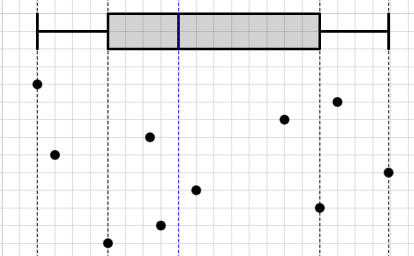
This example demonstrates how to quickly create box plots using GeoGebra, highlighting statistical distribution and key concepts like median, quartiles, and percentiles. It involves geometric transformations such as Point, Sequence, BoxPlot, Sort, Midpoint, and Dilate. Suitable for high school students or college freshmen learning statistics or geometric construction.
GeoGebra Commands & Parameters
Point(y = -1) → APoint(y = -2) → BPoint(y = -3) → CPoint(y = -4) → DPoint(y = -5) → EPoint(y = -6) → FPoint(y = -7) → GPoint(y = -8) → HPoint(y = -9) → IPoint(y = -10) → JSequence(x(Element[l1, i]), i, 1, n, 1) → l2, {0.00014104039788365527, 17, 14, 6.381173543534877, 1, 19.89736057290687, 9, 16, 7, 4}BoxPlot(2, 1, l2) → aSort(l2) → l3If(round(n / 2, 0) ≟ n / 2, x = Element[l3, n / 2]) → eq6If(round(n / 2, 0) ≟ n / 2, x = Element[l3, n / 2 + 1]) → eq7Intersect(eq6, y = 0) → KIntersect(eq7, y = 0) → LMidpoint(K, L) → MDilate(K, If[0 < b ≤ 1, 1 - b, 0], M) → K'Segment(K, K') → fDilate(M, If[1 < b ≤ 2, 2 - b, 0], L) → M'Segment(M, M') → gRotate(K, If[2 < b ≤ 3, ((b - 2) * pi), pi], M) → K'_{1}Rotate(K', If[2 < b ≤ 3, ((b - 2) * pi), pi], M) → K''Segment(K'_{1}, K'') → f'
AI Drawing Prompt Reference
Draw a box plot with points from -1 to -10 and a box plot. The box plot should show the median, first quartile, and third quartile. The box plot should be related to the points to show the distribution of the data.
The prompt above was compiled from the original drawing commands and is for reference only.