
Blueberry Flower Surface: Curve Construction and Spatial Assembly
Loading the math board and drawing, please wait…
In collections
Surfaces and flowers
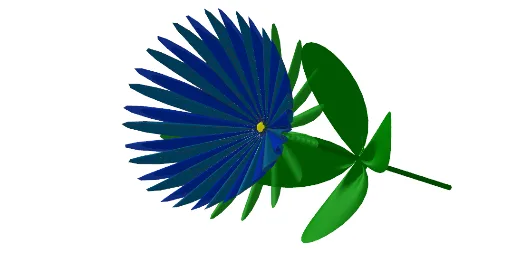
This example demonstrates how to generate a “blueberry flower” style 3D shape by building curves in Cartesian coordinates, applying spatial transformations, and assembling surfaces to form a cohesive solid appearance. Key mathematical ideas include: curve construction in coordinate geometry (CurveCartesian), surface generation in 3D (Surface), basic geometric entities (Segment and Midpoint) to define structural points, and transformations such as translation (Translate) to create repeated/symmetric components. Construction workflow: first use CurveCartesian to define the base curve; then translate relevant objects with Translate; use Segment and Midpoint to connect and locate key points; finally generate the main geometry via Surface, and incorporate spherical elements with Sphere to represent flower-like parts. The model uses many named points/parameters (e.g., a, b, O, m, n, i, h, A, B, C, D, etc.) and includes rendered/image elements (image1, image2) for visual enrichment. Suitable for high school to undergraduate geometry visualization, spatial reasoning practice, and STEM project-based learning where students explore how geometric commands translate into 3D forms.
GeoGebra Commands & Parameters
CurveCartesian(x(O) + ((a * cos(i° + n°)) * cos((m * i°) + n°)), y(O) + ((a * sin(i° + n°)) * cos((m * i°) + n°)), z(O) + (a * cos((m * i°) + n°)^(2)), i, 0, 720) → iCurveCartesian(x(O) + ((a * cos(i° + n°)) * cos((m * i°) + n°)), y(O) + ((a * sin(i° + n°)) * cos((m * i°) + n°)), z(O) + (a * cos((m * i°) + n°)^(2)), i, 0, 720) → h_1Translate(O, Vector[O, O - (0, h, 0)]) → O'Segment(O, O') → jMidpoint(j) → AMidpoint(O, A) → BCurveCartesian(x(O) + ((a * cos(i°)) * cos((m * i°))), y(O) + ((a * sin(i°)) * cos((m * i°))), z(O) + (a * cos((m * i°))^(2)), i, 0, 720) → fCurveCartesian(x(O) + ((a * cos(i°)) * cos((m * i°))), y(O) + ((a * sin(i°)) * cos((m * i°))), z(O) + (b * cos((m * i°))^(2)), i, 0, 720) → eCurveCartesian(x(A) + ((a * cos(i°)) * cos((k * i°))), y(A) + ((a * sin(i°)) * cos((k * i°))), z(A) + ((2 * b) * cos((k * i°))^(2)), i, 0, 720) → lCurveCartesian(x(A) + ((a * cos(i°)) * cos((k * i°))), y(A) + ((a * sin(i°)) * cos((k * i°))), z(A) + ((2 * b) * cos((k * i°))^(2)), i, 0, 720) → oCurveCartesian(x(O) + ((a * cos(i°)) * cos((m * i°))), y(O) + ((a * sin(i°)) * cos((m * i°))), z(O) + (b * cos((m * i°))^(2)), i, 0, 720) → gCurveCartesian(x(O) + ((a * cos(i°)) * cos((m * i°))), y(O) + (a * cos((m * i°))^(2)), z(O) + ((a * sin(i°)) * cos((m * i°))), i, 0, 720) → dSurface(x(O) + ((j * cos(i° + n°)) * cos((m * i°) + n°)), y(O) + (j * cos((m * i°) + n°)^(2)), z(O) + ((j * sin(i° + n°)) * cos((m * i°) + n°)), i, 0, 720, j, 0.01, 4.8) → cSurface(x(O) + ((j * cos(i°)) * cos((m * i°))), y(O) + ((0.5 * (j - 1)) * cos((m * i°))^(2)), z(O) + ((j * sin(i°)) * cos((m * i°))), i, 0, 720, j, 0, 4.8) → pSurface(x(A) + ((j * cos(i°)) * cos((k * i°))), y(A) + ((j - 1) * cos((k * i°))^(2)), z(A) + ((j * sin(i°)) * cos((k * i°))), i, 0, 720, j, 0.1, 4.8) → qSurface(x(C) + (((j - 0.5) * cos(i° + n°)) * cos((m * i°) + n°)), y(C) + ((j - 1) * cos((m * i°) + n°)^(2)), z(C) + (((j - 0.5) * sin(i° + n°)) * cos((m * i°) + n°)), i, 0, 720, j, 0.01, 4.8) → sSurface(x(O) + ((j * cos(i°)) * cos((m * i°))), y(O) + (j * cos((m * i°))^(2)), z(O) + ((j * sin(i°)) * cos((m * i°))), i, 0, 720, j, 0.01, 4.8) → rSphere(D, 0.65) → t
AI Drawing Prompt Reference
Create a 3D 'blueberry flower' shape by first constructing curves in the Cartesian coordinate system, then using translation, midpoints, and line segments to define key points, and finally generating the main geometry with surface commands. The model includes multiple parameter-controlled curves and surfaces, as well as specific geometric elements like points, lines, and spheres, all working together to form a blueberry-like 3D model.
The prompt above was compiled from the original drawing commands and is for reference only.