
Bisection Method for Real Roots
Loading the math board and drawing, please wait…
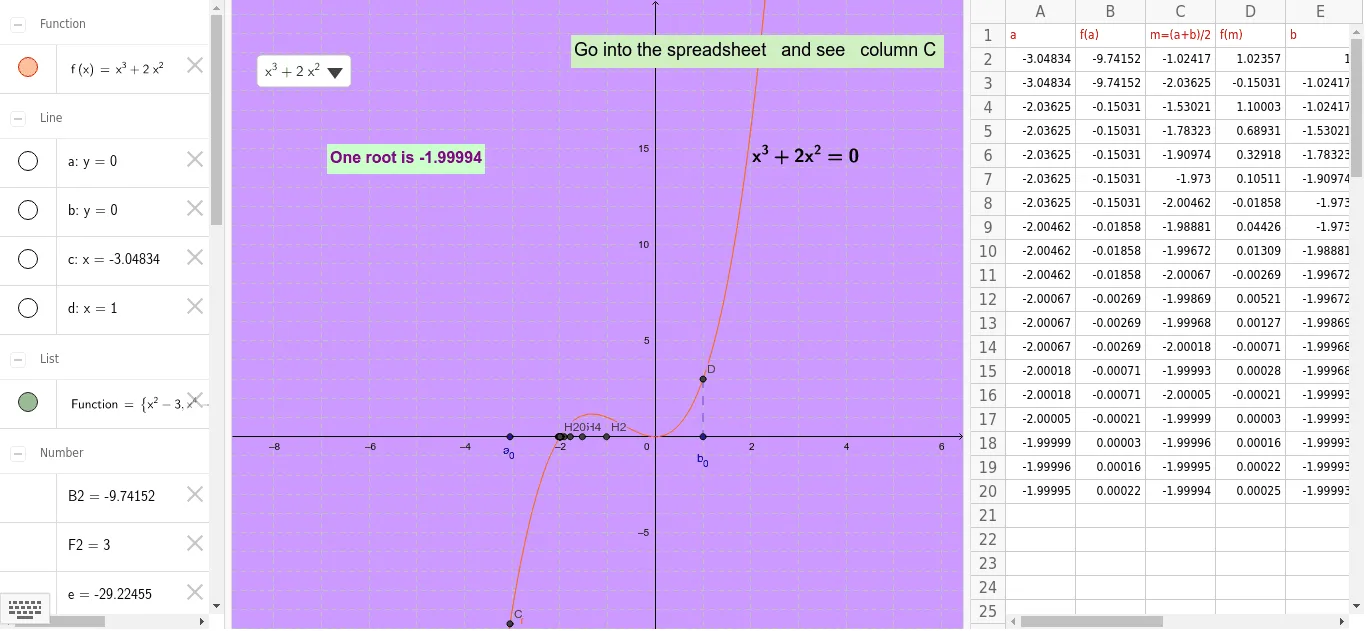
This example demonstrates the bisection method for finding real roots of an equation dynamically. It involves core math concepts like real roots, interval bisection, and the median value theorem. GeoGebra commands such as Point, SelectedElement, If, Line, OrthogonalLine, Intersect, Segment, and Text are used to visualize the function graph, intervals, midpoints, and segments. Suitable for high school mathematics teaching to understand the algorithmic and geometric principles of the bisection method.
GeoGebra Commands & Parameters
Point(xAxis) → APoint(xAxis) → BSelectedElement(Function) → fIf((B2 * D2) < 0, true, false) → G2If(G2, A2, C2) → A3If(G2, C2, E2) → E3If((B3 * D3) < 0, true, false) → G3If(G3, A3, C3) → A4If(G3, C3, E3) → E4If((B4 * D4) < 0, true, false) → G4If(G4, A4, C4) → A5If(G4, C4, E4) → E5If((B5 * D5) < 0, true, false) → G5If(G5, A5, C5) → A6If(G5, C5, E5) → E6If((B6 * D6) < 0, true, false) → G6If(G6, A6, C6) → A7If(G6, C6, E6) → E7If((B7 * D7) < 0, true, false) → G7If(G7, A7, C7) → A8If(G7, C7, E7) → E8If((B8 * D8) < 0, true, false) → G8If(G8, A8, C8) → A9If(G8, C8, E8) → E9If((B9 * D9) < 0, true, false) → G9If(G9, A9, C9) → A10If(G9, C9, E9) → E10If((B10 * D10) < 0, true, false) → G10If(G10, A10, C10) → A11If(G10, C10, E10) → E11If((B11 * D11) < 0, true, false) → G11If(G11, A11, C11) → A12If(G11, C11, E11) → E12If((B12 * D12) < 0, true, false) → G12If(G12, A12, C12) → A13If(G12, C12, E12) → E13If((B13 * D13) < 0, true, false) → G13If(G13, A13, C13) → A14If(G13, C13, E13) → E14If((B14 * D14) < 0, true, false) → G14If(G14, A14, C14) → A15If(G14, C14, E14) → E15If((B15 * D15) < 0, true, false) → G15If(G15, A15, C15) → A16If(G15, C15, E15) → E16If((B16 * D16) < 0, true, false) → G16If(G16, A16, C16) → A17If(G16, C16, E16) → E17If((B17 * D17) < 0, true, false) → G17If(G17, A17, C17) → A18If(G17, C17, E17) → E18If((B18 * D18) < 0, true, false) → G18If(G18, A18, C18) → A19If(G18, C18, E18) → E19If((B19 * D19) < 0, true, false) → G19If(G19, A19, C19) → A20If(G19, C19, E19) → E20If((B20 * D20) < 0, true, false) → G20Line(A, xAxis) → aLine(A, a) → bOrthogonalLine(A, b) → cOrthogonalLine(B, b) → dIntersect(f, c) → CIntersect(f, d) → DSegment(D, B) → gText(f) → text2If(e > 0, text4, text1) → text5
AI Drawing Prompt Reference
Draw a function graph and demonstrate the bisection method for finding real roots. Mark two points on the x-axis, and dynamically show intervals containing these points based on the sign change of the function values. Draw line segments at the midpoints of these intervals, repeating the process to show the intervals narrowing down and approaching the function's real root.
The prompt above was compiled from the original drawing commands and is for reference only.