
Bisecting a Triangle
Loading the math board and drawing, please wait…
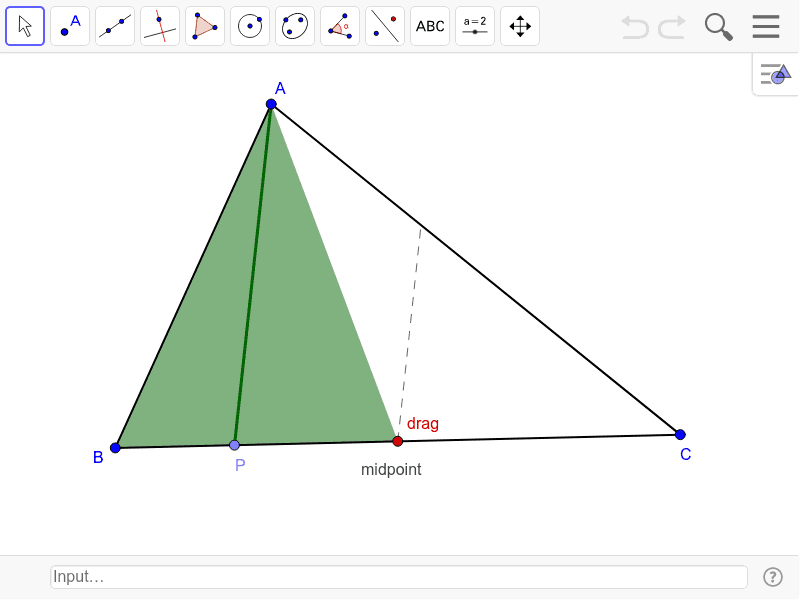
This example demonstrates how to bisect an angle of a triangle through a point on one side. It involves core mathematical concepts such as angle bisector, midpoint of a segment, and symmetry. Construction highlights include using GeoGebra commands/objects like Segment, Midpoint, Point, Line, Ray, Semicircle, Intersect, and Polygon; objects include A, B, a, C, b, c, M, P, d, e, f, g, h, F, poly1, f_1, a_1, e_1, poly2, c_1, a_2, b_1, D, E, i, drag, poly3, g_1, a_3, p. Suitable for middle school and above learning geometric constructions.
GeoGebra Commands & Parameters
Segment(A, B) → aSegment(B, C) → bSegment(C, A) → cMidpoint(B, C) → MPoint(b) → PSegment(A, M) → dSegment(A, P) → eLine(M, e) → fRay(M, P) → gSemicircle(B, C) → hIntersect(h, g) → F,Polygon(A, P, F) → poly1, f_1, a_1, e_1Polygon(A, B, C) → poly2, c_1, a_2, b_1Intersect(f, poly2) → D, ESegment(M, D) → iPoint(i) → dragPolygon(A, P, drag) → poly3, g_1, a_3, p