
Bezier Surface: Parametric Surface Construction via Control Point Grid
Loading the math board and drawing, please wait…
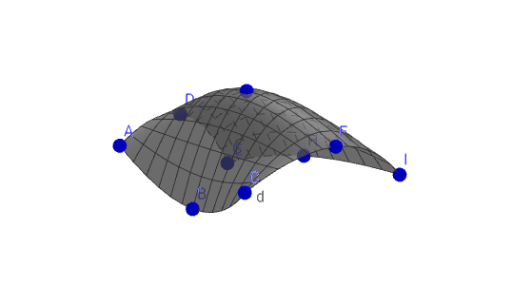
This example demonstrates how to construct a Bezier surface using GeoGebra's surface command, a parametric surface defined by a grid of control points, widely used in computer graphics and CAD modeling. Core mathematical concepts include parametric equations, bivariate polynomial interpolation (Bernstein basis functions), and surface parameterization in 3D space. Construction highlights: from the summary, it uses the Surface and CurveCartesian commands, involving nine control points labeled A through I (likely forming a 3×3 grid), along with function f and parameters a, b, c, d; adjusting control point positions or parameter values dynamically alters the surface shape. Suitable for high school to university-level courses in mathematics or computer graphics, providing an intuitive understanding of parametric surfaces, the influence of control points on shape, and fundamental principles of 3D geometric modeling.
GeoGebra Commands & Parameters
Surface((s^(2) * ((t^(2) * A) + (((2 * (1 - t)) * t) * B) + ((1 - t)^(2) * C))) + (((2 * (1 - s)) * s) * ((t^(2) * D) + (((2 * (1 - t)) * t) * E) + ((1 - t)^(2) * F))) + ((1 - s)^(2) * ((t^(2) * G) + (((2 * (1 - t)) * t) * H) + ((1 - t)^(2) * I))), s, 0, 1, t, 0, 1) → fCurveCartesian((t^(2) * A) + (((2 * (1 - t)) * t) * ((2 * B) - A / 2 - C / 2)) + ((1 - t)^(2) * C), t, 0, 1) → aCurveCartesian((t^(2) * D) + (((2 * (1 - t)) * t) * ((2 * E) - D / 2 - F / 2)) + ((1 - t)^(2) * F), t, 0, 1) → bCurveCartesian((t^(2) * G) + (((2 * (1 - t)) * t) * ((2 * H) - G / 2 - I / 2)) + ((1 - t)^(2) * I), t, 0, 1) → cSurface((s^(2) * a(t)) + (((2 * (1 - s)) * s) * ((2 * b(t)) - a(t) / 2 - c(t) / 2)) + ((1 - s)^(2) * c(t)), s, 0, 1, t, 0, 1) → d