
Bernoulli's Lemniscate Formed from an Isosceles Trapezoid
Loading the math board and drawing, please wait…
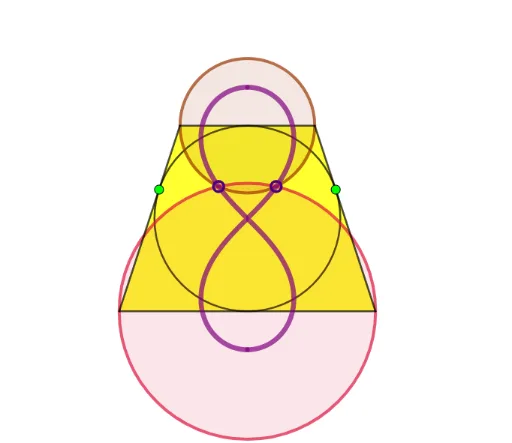
This example demonstrates how to form Bernoulli's Lemniscate using an isosceles trapezoid. Key mathematical concepts include coordinate geometry and parametric equations. Construction highlights the use of Intersect, Circle, Semicircle, Point, Mirror, Tangent, Polygon, and Locus commands in GeoGebra. Suitable for high school math education and learning about parametric equations and loci.
GeoGebra Commands & Parameters
Intersect(xAxis, yAxis) → ACircle(A, 1) → cIntersect(c, yAxis) → B, CSemicircle(C, B) → dPoint(d) → DMirror(D, yAxis) → D'Tangent(D', c) → f,Tangent(D, c) → g,Tangent(C, c) → h,Tangent(B, c) → i,Intersect(f, h) → EIntersect(f, i) → FIntersect(g, i) → GIntersect(g, h) → HPolygon(E, F, G, H) → q1, e, f_1, g_1, h_1Circle(C, H) → kCircle(B, G) → pIntersect(k, p) → I, J, ,Locus(I, D) → loc1Locus(J, D) → loc2
AI Drawing Prompt Reference
Draw an isosceles trapezoid and form a lemniscate using its vertices and midpoints. Start by drawing the intersection point A of the x-axis and y-axis, then draw a unit circle c centered at A, find the intersection points B and C of circle c with the y-axis, draw a semicircle d centered at C, find point D on semicircle d and reflect it across the y-axis to get D', then draw circle f centered at D', draw circle g centered at D, draw circle h centered at C, draw circle i centered at B, find the intersection points E and F of circle f and circle h, circle f and circle i, circle g and circle i, circle g and circle h, connect points E, F, G, H to form a polygon q1, draw circle k centered at H, draw circle p centered at G, find the intersection points I and J of circle k and circle p, and form the lemniscate loc1 and loc2 with D as the parameter.
The prompt above was compiled from the original drawing commands and is for reference only.