
Barycentric Coordinates
Loading the math board and drawing, please wait…
In collections
barycentric coordinates
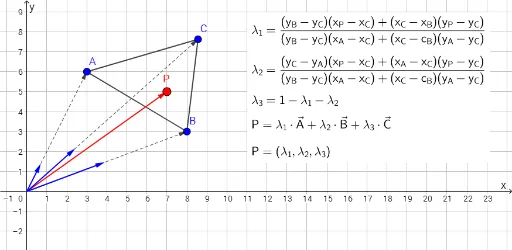
This example demonstrates how to use barycentric coordinates to represent a point inside a triangle. Key mathematical concepts include barycentric coordinates and vectors. Using GeoGebra commands such as Polygon, PointIn, and Vector, a dynamic triangle is constructed, and the movement of a point within the triangle is observed. Suitable for high school geometry and coordinate geometry courses.
GeoGebra Commands & Parameters
Polygon(A, B, C) → driehoek1, c, a, bPointIn(driehoek1) → PPolygon(P, B, C) → driehoek2, c_1, d, b_1Polygon(A, P, C) → driehoek3, c_2, a_1, d_1Polygon(A, B, P) → driehoek4, d_2, a_2, b_2Vector(A) → oaVector(B) → obVector(C) → oc
AI Drawing Prompt Reference
Draw a triangle and place a point inside it. Connect the point to each vertex to form three smaller triangles. Draw vectors from each vertex to the midpoint of the opposite side and observe the dynamic relationship between the vectors and the point.
The prompt above was compiled from the original drawing commands and is for reference only.