
B11 Geometric Construction Example
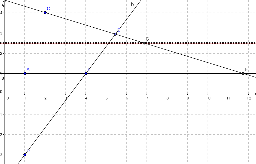
Loading the math board and drawing, please wait…
This example demonstrates how to construct isosceles triangles and rotations to showcase geometric transformations. The core math concepts involved include isosceles triangles, rotation, coordinate geometry, and locus. Construction highlights the use of GeoGebra commands such as Line, Point, Intersect, Midpoint, Locus, and LocusEquation. Suitable for high school mathematics teaching and geometric construction learning.
GeoGebra Commands & Parameters
Line(A, B) → aLine(D, B) → bPoint(b) → ELine(C, E) → cIntersect(a, c) → FMidpoint(C, F) → GLocus(G, E) → loc1LocusEquation(G, E) → d
AI Drawing Prompt Reference
Draw a geometric construction: start with a horizontal line and a slanted line intersecting at a point. Pick a point on the slanted line, connect it to a fixed point to form a new line that meets the horizontal line at another point. Take the midpoint of this intersection and the fixed point. As the point on the slanted line moves, trace the locus of the midpoint and display its equation curve. This illustrates isosceles triangles and rotational symmetry.
The prompt above was compiled from the original drawing commands and is for reference only.