
Axial Symmetry, Areas, and Perimeters
Loading the math board and drawing, please wait…
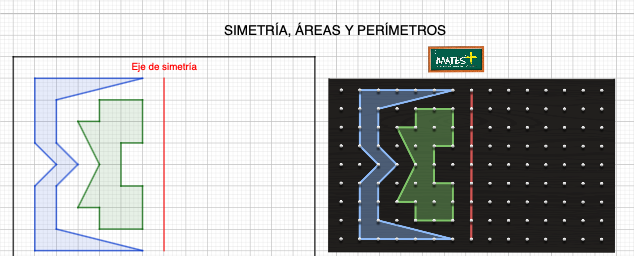
This example demonstrates the calculation of areas and perimeters of axially symmetric figures. It involves core mathematical concepts such as axial symmetry, area, perimeter, and geometric construction. The construction uses GeoGebra commands like Polygon, Point, Segment, and Intersect. Suitable for middle school and above students learning geometric transformations and calculations.
GeoGebra Commands & Parameters
Polygon(C, D, M, N, O, P, E, F, G, H, I, J, K, L) → polígono1, c, l, m, n, o, p, d, e, f, g, h, i, j, kPolygon(Q, R, S, T, U, V) → polígono2, q, r, s, t, u, vPoint(v) → WPoint(v) → E_1Point(v) → H_1Polygon(W, Z, H_1, A_1, B_1, C_1, D_1, V, E_1, F_1, G_1) → polígono3, w, g_1, h_1, z_1, a_1, b_1, c_1, d_1, v_1, e_1, f_1Segment(I_1, J_1) → i_1Intersect(q, v) → K_1Intersect(q, r) → L_1Intersect(r, s) → M_1Intersect(s, t) → N_1Intersect(t, z_1) → O_1Intersect(a_1, b_1) → Q_1Intersect(b_1, c_1) → R_1Intersect(c_1, d_1) → S_1Point(v) → T_1Intersect(f_1, g_1) → U_1Intersect(e_1, f_1) → V_1Point(v) → W_1Polygon(K_1, L_1, U_1, V_1, W_1, M_1, N_1, O_1, P_1, Q_1, R_1, S_1, T_1) → polígono4, k_1, t_1, u_1, v_2, w_1, l_1, m_1, n_1, o_1, p_1, q_1, r_1, s_1Polygon(H_2, I_2, J_2, K_2) → c1, h_2, i_2, j_2, k_2
AI Drawing Prompt Reference
Draw an axially symmetric figure composed of multiple polygons, including a large polygon with many vertices and a hexagon, connected by intersection points to form a complex outline. Include a segment and several intersection points derived from polygon edges, which are then used to construct an additional polygon. Start with the basic polygons, then add points, segments, and intersections to build the final symmetric shape for area and perimeter calculations.
The prompt above was compiled from the original drawing commands and is for reference only.