
Autonomous Equations: Slope Field and Numerical Solutions
Loading the math board and drawing, please wait…
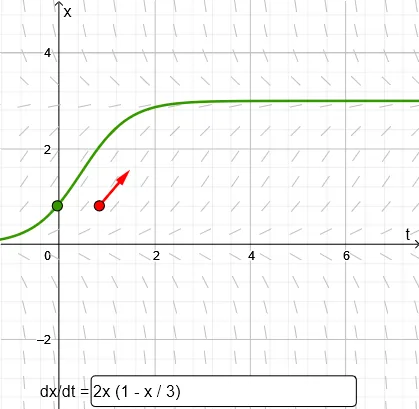
This GeoGebra example visualizes autonomous differential equations by displaying their slope fields (direction fields) and numerical solution curves. The core mathematical concepts include autonomous ODEs (where the right-hand side does not explicitly depend on the independent variable), slope fields, initial value problems, and numerical integration methods such as Euler or Runge-Kutta. The construction uses GeoGebra commands: SlopeField to generate the direction field, SolveODE to compute numerical solutions, Length, Vector, and Segment to build direction and normal vectors, Textfield and InputBox1 for interactive input of the equation or initial conditions, h as the step size, B as a draggable point, and numericalIntegral1 and numericalIntegral2 to display integral curves for different initial values. This resource is ideal for university-level calculus or differential equations courses, helping students understand equilibrium points, stability, and phase-line analysis, and can also serve as an advanced enrichment for high school mathematics.
GeoGebra Commands & Parameters
Length(dir) → nrmVector(A, A + dir / nrm) → uTextfield(g) → InputBox1Segment((y(A), 0), (y(A), g(y(A)))) → hSlopeField(f(x, y), 20, 0.5, -2, -5, 10, 5) → slopefield1SolveODE(f, x(B), y(B), 10, 0.1) → numericalIntegral1SolveODE(f, x(B), y(B), -2, 0.1) → numericalIntegral2
AI Drawing Prompt Reference
Create a slope field for an autonomous differential equation, with the horizontal axis as the independent variable and the vertical axis as the dependent variable. Distribute short line segments evenly across the plane to show the direction field. Add two numerical solution curves, one extending right and one left, both starting from the same draggable initial point. Place an input box on the side for entering the differential equation expression. Also show a vertical segment from a point on the horizontal axis up to the function curve, representing the function value at that point. Keep the layout clear for teaching.
The prompt above was compiled from the original drawing commands and is for reference only.