
Area & Perimeter of Regular Polygons in a Unit Circle
Loading the math board and drawing, please wait…
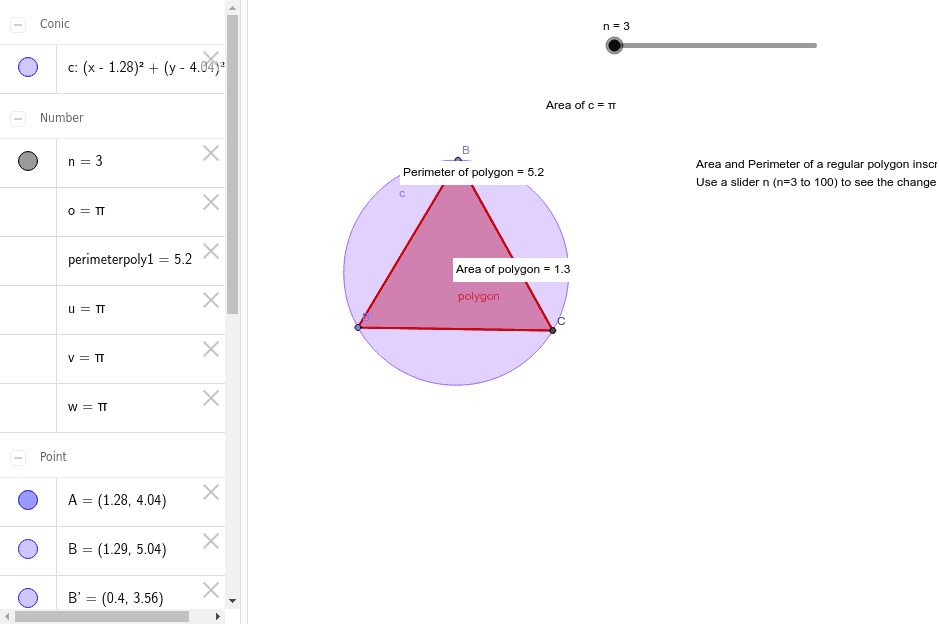
This example demonstrates the area and perimeter of regular polygons (up to 100-gon) inscribed in a unit circle. Key math concepts include circle, polygon, area, perimeter, and trigonometry. It is constructed using GeoGebra commands like Circle, Point, Rotate, Polygon, Perimeter, and Area. Suitable for high school mathematics education or self-learning to understand the relationship between regular polygons and circles, as well as calculation methods.
GeoGebra Commands & Parameters
Circle(A, 1) → cPoint(c) → BRotate(B, (360 / n)°, A) → B'Polygon(B, B', n) → polygon, a, k, U, V, W, Z, A_1, B_1, C_1, D_1, E_1, F_1, l, G_1, H_1, I_1, J_1, K_1, L_1, M_1, N_1, O_1, P_1, m, Q_1, R_1, S_1, T_1, U_1, V_1, W_1, Z_1, A_2, B_2, p, C_2, D_2, E_2, F_2, G_2, H_2, I_2, J_2, K_2, L_2, q, M_2, N_2, O_2, P_2, Q_2, R_2, S_2, T_2, U_2, V_2, r, W_2, Z_2, A_3, B_3, C_3, D_3, E_3, F_3, G_3, H_3, s, I_3, t, a_1, b_1, b, c_1, d_1, e_1, f_1, g_1, h_1, i_1, j_1, k_1, l_1, d, m_1, n_1, p_1, q_1, r_1, s_1, t_1, a_2, b_2, c_2, e, d_2, e_2, f_2, g_2, h_2, i_2, j_2, k_2, l_2, m_2, f, n_2, p_2, q_2, r_2, s_2, t_2, a_3, b_3, c_3, d_3, g, e_3, f_3, g_3, h_3, i_3, j_3, k_3, l_3, m_3, n_3, h, p_3, q_3, r_3, s_3, t_3, a_4, b_4, c_4, d_4, e_4, i, f_4, g_4, C, D, E, F, G, H, I, J, j, K, L, M, N, O, P, Q, R, S, TPerimeter(polygon) → perimeterpoly1PointIn(polygon) → Pointpoly1_1PointIn(polygon) → Pointpoly1Area(c) → oPointIn(c) → Pointc_1Area(c) → uPointIn(c) → Pointc_2Area(c) → vPointIn(c) → Pointc_3Area(c) → wPointIn(c) → PointcPointIn(polygon) → Pointpolygon
AI Drawing Prompt Reference
Draw a regular polygon inscribed in a unit circle, with sides ranging from 3 to 100, to demonstrate its area and perimeter. The polygon is constructed by equally dividing the circle's circumference and connecting the division points, while labeling key geometric properties such as area and perimeter.
The prompt above was compiled from the original drawing commands and is for reference only.