
Area of Triangle, Trapezoid, and Parallelogram
Loading the math board and drawing, please wait…
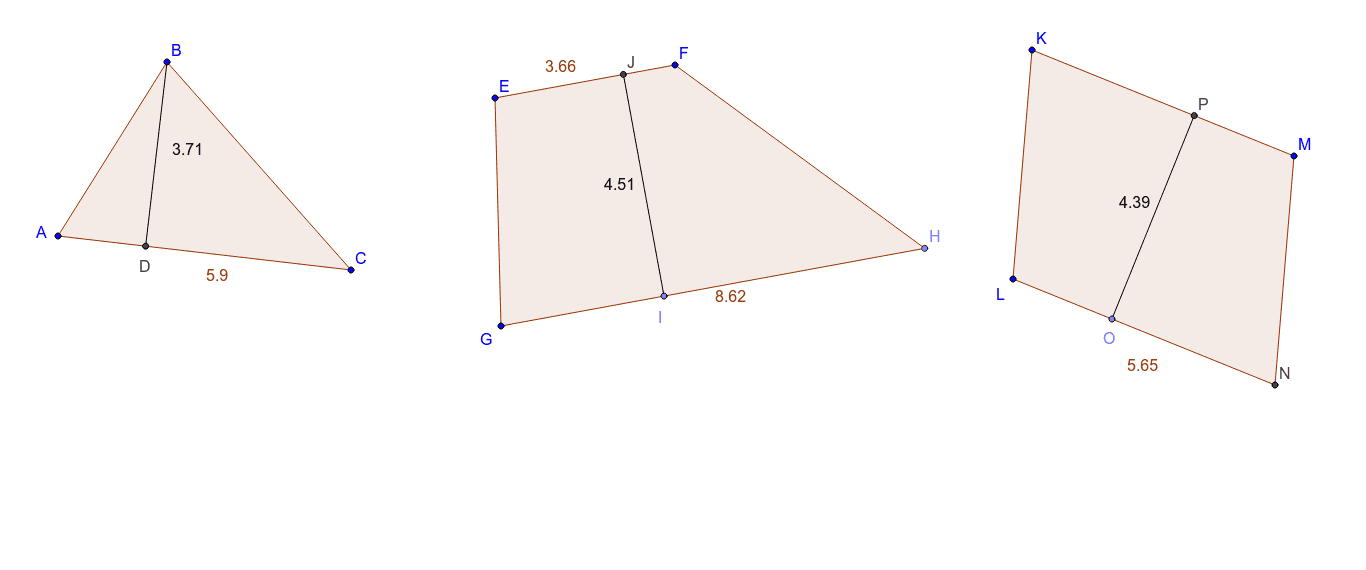
This example demonstrates how to calculate the area of triangles, trapezoids, and parallelograms using different heights and bases. Key mathematical concepts include area formulas, geometric construction, and parameterization. Construction involves using GeoGebra commands like Polygon, Line, OrthogonalLine, etc. Suitable for middle school students learning geometry or for educational demonstrations.
GeoGebra Commands & Parameters
Polygon(A, B, C) → poly1, c, a, bLine(A, C) → dOrthogonalLine(B, d) → eIntersect(d, e) → DSegment(D, B) → fLine(E, F) → gLine(G, g) → hPoint(h) → HPolygon(E, G, H, F) → poly2, e_1, g_1, h_1, f_1Point(g_1) → IOrthogonalLine(I, g_1) → iIntersect(g, i) → JSegment(J, I) → jLine(K, L) → kLine(K, M) → lLine(M, k) → mLine(L, l) → nIntersect(m, n) → NPolygon(L, K, M, N) → poly3, l_1, k_1, m_1, n_1Point(n_1) → OOrthogonalLine(O, k_1) → pIntersect(l, p) → PSegment(P, O) → q
AI Drawing Prompt Reference
Draw a triangle and its three altitudes, labeling the triangle, altitudes, and bases with different colors. Then, inside the triangle, draw a parallelogram with one side coinciding with a triangle side and the opposite side coinciding with an altitude, labeling it with different colors. Finally, inside the parallelogram, draw a trapezoid with one side coinciding with a parallelogram side and the opposite side coinciding with a parallelogram altitude, labeling it with different colors.
The prompt above was compiled from the original drawing commands and is for reference only.