
Area of Trapezoid Applet: Deriving Trapezoid Area from Parallelogram Area
Loading the math board and drawing, please wait…
In collections
Surface Area and Volume
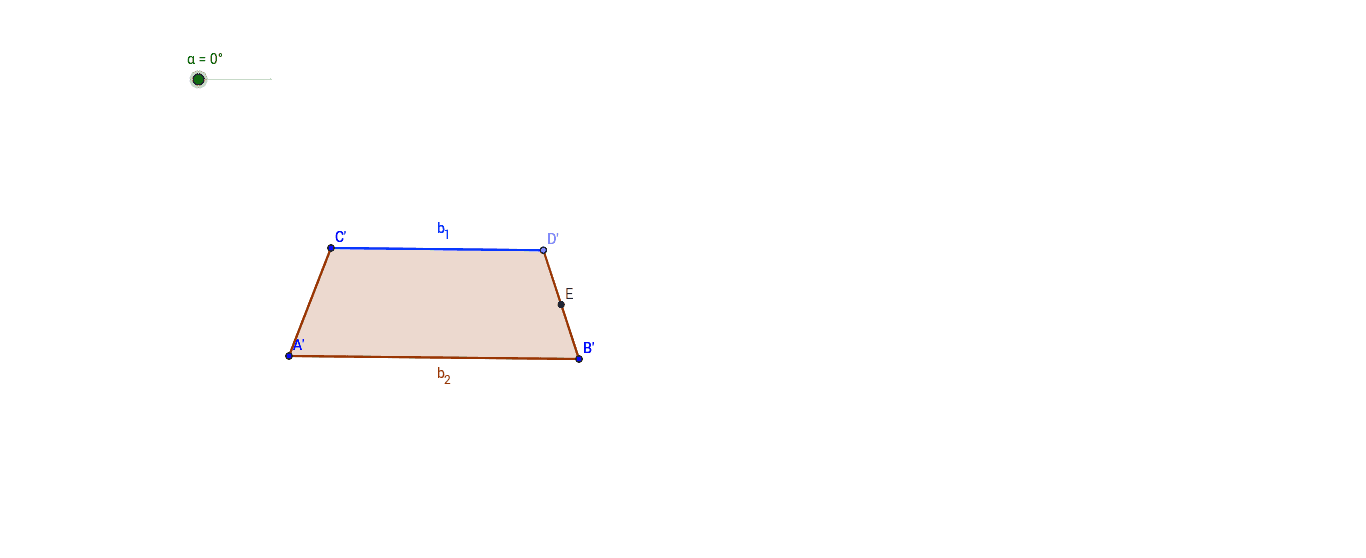
This GeoGebra applet demonstrates how to determine the area of a trapezoid by using the area of a parallelogram. The construction dynamically rotates a trapezoid about the midpoint of one leg to form a parallelogram, offering an intuitive geometric derivation of the trapezoid area formula. Core mathematical concepts covered include trapezoid area, parallelogram area, midpoint properties, rotation transformation, congruent figures, and area invariance under rigid motion. The figure is constructed using GeoGebra commands Segment, Line, Point, Polygon, Midpoint, and Rotate, with objects including vertices A, B, C, D, polygons poly1 and poly1′, rotation angle α, and midpoint E. It is suitable for middle school and high school geometry instruction, ideal for teacher-led demonstrations of area formula derivations or student-centered exploration of relationships between quadrilateral areas.
GeoGebra Commands & Parameters
Segment(A, B) → aSegment(C, A) → bLine(C, a) → cPoint(c) → DSegment(C, D) → dSegment(B, D) → ePolygon(C, A, B, D) → poly1, c_1, a_1, b_2, d_1Midpoint(D, B) → ERotate(C, -α, E) → C'Rotate(A, -α, E) → A'Rotate(B, -α, E) → B'Rotate(D, -α, E) → D'Polygon(C', A', B', D') → poly1', c', a', b', b_1
AI Drawing Prompt Reference
Draw a trapezoid and rotate one of its legs around the midpoint to form a parallelogram, demonstrating the relationship between the trapezoid's and parallelogram's areas, with a dynamic rotation showing the midpoint property.
The prompt above was compiled from the original drawing commands and is for reference only.