
Area of Trapezium -- Duplication: Dynamic Geometric Construction
Loading the math board and drawing, please wait…
In collections
Mathematics Form 1
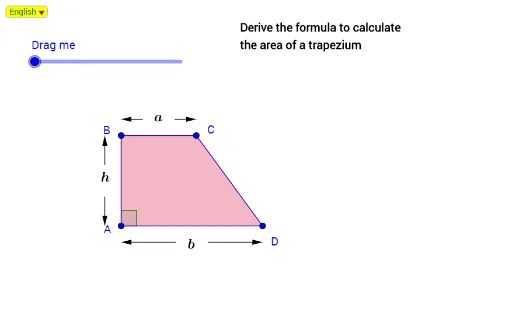
This GeoGebra example demonstrates the area of a trapezium through a duplication construction, visually showing how the original trapezoid can be transformed into a shape with twice its area, such as a parallelogram, to verify the area formula. The core mathematical concepts include trapezium (trapezoid), parallelogram, area conservation, rotation transformation, midpoints, and inscribed circles. The construction uses GeoGebra commands such as Line, Point, Polygon, DynamicCoordinates, SelectedIndex, Midpoint, Circle, Angle, Intersect, and rotation (Putar) to create the original trapezoid and its duplicated copies (poly1', poly1''), along with auxiliary points and lines. This resource is suitable for middle school or high school geometry classes, helping students intuitively understand the derivation of the trapezoid area formula and serving as a model for dynamic geometry lesson design.
GeoGebra Commands & Parameters
Line(A, xAxis) → aPoint(a) → DIf(abs(x(H) - x(A)) < 0.2, (x(A), y(H)), H) → PmDynamicCoordinates(H, x(Pm), y(Pm)) → BLine(B, a) → cPoint(c) → CIf(p ≟ true, C, D) → PutarPolygon(A, B, C, D) → poly1, a_1, b_1, c_1, dLine(A, yAxis) → bIntersect(c, b) → EIf(e ≤ 1, Rotate[B, (180° * e), Putar], Rotate[B, 180°, Putar]) → B'If(e ≤ 1, Rotate[C, (180° * e), Putar], Rotate[C, 180°, Putar]) → C'If(e ≤ 1, Rotate[D, (180° * e), Putar], Rotate[D, 180°, Putar]) → D'If(e ≤ 1, Rotate[A, (180° * e), Putar], Rotate[A, 180°, Putar]) → A'If(p ≟ true, Vector[C, D], Vector[D, C]) → uPolygon(A', B', C', D') → poly1', a', b', c', d'If(e > 1, Translate[A', Vector[((e - 1) * u)]]) → A''If(e > 1, Translate[B', Vector[((e - 1) * u)]]) → B''If(e > 1, Translate[C', Vector[((e - 1) * u)]]) → C''If(e > 1, Translate[D', Vector[((e - 1) * u)]]) → D''Polygon(A'', B'', C'', D'') → poly1'', a'', b'', c'', d''Midpoint(B, C) → FMidpoint(A, D) → GCircle(F, ja) → fIntersect(f, c) → I_2, I_1Circle(I_1, ja) → kCircle(I_2, ja) → p_2Line(I_1, b) → jLine(I_2, b) → gIntersect(p_2, g, 2) → I_3Intersect(k, j, 2) → I_4Circle(C, ja) → qLine(C, b) → iIntersect(q, i, 2) → LCircle(B, ja) → rLine(B, b) → lIntersect(r, l, 2) → MCircle(G, ja) → sIntersect(s, a) → P_4, P_3Circle(P_3, ja) → tCircle(P_4, ja) → d_1Line(P_3, b) → hLine(P_4, b) → mIntersect(d_1, m, 1) → P_1Intersect(t, h, 1) → P_2Circle(D, ja) → e_1Circle(A, ja) → f_1Intersect(f_1, b, 1) → RLine(D, b) → nIntersect(e_1, n, 1) → SCircle(E, ja) → g_1Intersect(a, i) → TIntersect(g_1, c, 1) → UIntersect(f_1, a, 1) → VMidpoint(E, A) → WCircle(W, ja) → h_1Intersect(h_1, b, 2) → ZIntersect(h_1, b, 1) → A_1Circle(Z, ja) → k_1Circle(A_1, ja) → p_1Line(Z, c) → i_1Line(A_1, c) → j_1Intersect(k_1, i_1, 1) → B_1Intersect(p_1, j_1, 1) → C_1Intersect(l, i_1) → D_1Intersect(l, j_1) → E_1Intersect(a, l) → F_1Circle(D_1, ja) → q_1Circle(E_1, ja) → r_1Midpoint(F_1, B) → G_1Intersect(r, c, 1) → H_1Intersect(q_1, i_1, 1) → I_5Intersect(r_1, j_1, 1) → J_1Circle(F_1, ja) → s_1Intersect(s_1, a, 1) → K_1Intersect(r_1, j_1, 2) → IIntersect(q_1, i_1, 2) → JIntersect(s_1, a, 2) → KIntersect(r, c, 2) → NIntersect(k, j, 1) → OIntersect(q, i, 1) → PIntersect(p_2, g, 1) → QIntersect(r, l, 1) → L_1If(p ≟ true, Vector[I_3, M], Vector[Q, L_1]) → vIf(p ≟ true, Vector[I_4, L], Vector[O, P]) → wIntersect(f_1, b, 2) → M_1Intersect(d_1, m, 2) → N_1Intersect(t, h, 2) → O_1Intersect(e_1, n, 2) → Q_1If(p ≟ true, Vector[P_1, R], Vector[N_1, M_1]) → u_1If(p ≟ true, Vector[P_2, S], Vector[O_1, Q_1]) → v_1If(p ≟ true, Vector[B_1, V], Vector[C_1, V]) → w_1If(p ≟ true, Vector[C_1, U], Vector[B_1, U]) → l_1If(p ≟ true, Vector[J, K], Vector[I, K]) → m_1If(p ≟ true, Vector[I, N], Vector[J, N]) → n_1Angle(D, A, B) → αAngle(C, B, A) → βAngle(C, D, A) → γAngle(D, C, B) → δSelectedIndex(Bahasa) → nnIf(nn ≟ 1, "Derive the formula to calculate", "Menerbit rumus untuk menghitungkan") → Tex1If(nn ≟ 1, "the area of a trapezium", "luas bentuk trapezium") → Tex2
AI Drawing Prompt Reference
Draw a trapezoid with a horizontal base. Place two points on the base as lower vertices, then draw a parallel line above and place two points as upper vertices, connecting all four to form the trapezoid. Rotate the entire trapezoid 180 degrees around one of its vertices to create a rotated copy. Then translate this rotated copy horizontally so that it joins the original trapezoid to form a parallelogram. Finally, draw the diagonals of the trapezoid, mark their midpoints, and connect these midpoints with dashed lines to show the area relationship.
The prompt above was compiled from the original drawing commands and is for reference only.