
Area of the Shaded Region
Loading the math board and drawing, please wait…
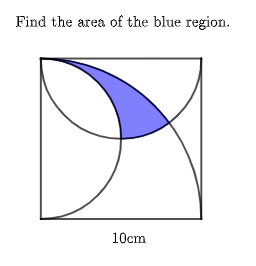
This example demonstrates how to calculate the area of the shaded region using geometric construction. Key mathematical concepts include geometry, square, and circumcircle. Using GeoGebra commands such as Intersect, Point, Segment, Semicircle, CircleArc, Midpoint, and Locus, the shaded region is constructed and its area is calculated. Suitable for middle school and above students or teachers.
GeoGebra Commands & Parameters
Intersect(xAxis, yAxis) → APoint(xAxis) → BPoint(yAxis) → CSegment(C, D) → fSegment(D, B) → gSegment(B, A) → hSegment(A, C) → iSemicircle(C, A) → cSemicircle(D, C) → dCircleArc(A, B, C) → eIntersect(c, d, 2) → EIntersect(d, e, 1) → FCircleArc(A, F, C) → kMidpoint(i) → GCircleArc(G, E, C) → pMidpoint(C, D) → HCircleArc(H, E, F) → qPoint({k, p, q}) → ILocus(I', I) → loc1
AI Drawing Prompt Reference
Draw a geometric shape consisting of two semicircles and two line segments, including a square and a circumcircle. Start by plotting the intersection of the coordinate axes, then connect these points to form the square and two line segments. Next, draw two semicircles using the vertices and sides of the square, and then draw a circular arc connecting these semicircles. Finally, find the intersection points of the semicircles and the arc, and draw circular arcs using these points to complete the shape.
The prompt above was compiled from the original drawing commands and is for reference only.