
Area of the Region Between Two Function Graphs
Loading the math board and drawing, please wait…
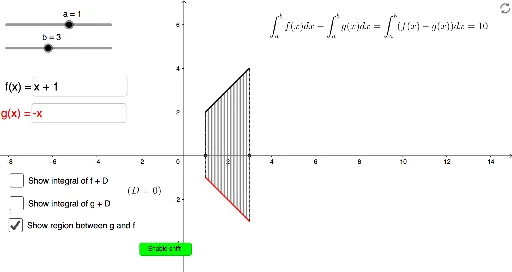
① This example demonstrates how to compute and visualize the area of the region enclosed between two function curves over a given interval. ② The core mathematical concept is the application of definite integrals in geometry: the area between f(x) and g(x) on [a,b] equals ∫|f(x)-g(x)|dx, involving function graphs, interval partitioning, and the relationship between approximate and exact area. ③ Construction highlights: GeoGebra commands such as Integral (for intF and intG), Segment (for boundary segments), Sequence (to generate vertical stripes), Textfield and InputBox (for entering functions and endpoints), checkboxes (showBetween, showIntF, showIntG) to toggle displays, and buttons (button1, button2) for explanations or reset. ④ Suitable for high school to early college calculus instruction, helping students intuitively grasp area via definite integrals, handling sign differences of functions, and comparing numerical approximations with exact values.
GeoGebra Commands & Parameters
Simplify(g1(x) + D) → g2Simplify(f1(x) + D) → f2Segment((a, g(a)), (a, f(a))) → segAIntegral(g, a, b) → intGIntegral(f, a, b) → intFTextfield(f1) → InputBox1Textfield(g1) → InputBox2Sequence(Segment[(kk(k), g(kk(k))), (kk(k), f(kk(k)))], k, 0, n) → stripesSegment((b, Min[0, g(b)]), (b, f(b))) → segBSegment((a, 0), (a, f(a))) → seg0FaSegment((b, 0), (b, f(b))) → seg0Fb
AI Drawing Prompt Reference
Draw the area between two function graphs over a given interval, first plot the function curves, then draw vertical segments at the interval endpoints, next create vertical stripes between the curves, calculate and display the definite integrals of the functions over the interval, and finally use text fields to input functions and endpoints, with checkboxes to toggle the display of the area, integrals, and stripes, using a slider to adjust the number of stripes.
The prompt above was compiled from the original drawing commands and is for reference only.