
Area of Square
Loading the math board and drawing, please wait…
In collections
geometriadinamica.es
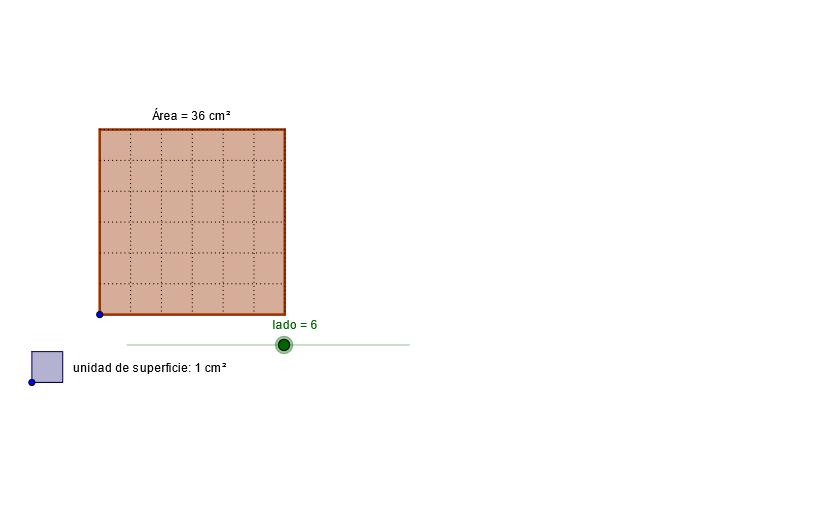
This example demonstrates the calculation of the area of a square. Key mathematical concepts include geometric construction and area calculation. Using GeoGebra commands such as Circle, Ray, OrthogonalLine, Intersect, Polygon, Mirror, Segment, and Point, a square is constructed and its area is calculated. Suitable for middle school and above students learning geometry and area calculation.
GeoGebra Commands & Parameters
Circle(A, lado) → cRay(A, B) → aCircle(A, lado) → dOrthogonalLine(A, a) → bIntersect(d, b, 1) → COrthogonalLine(C, b) → eIntersect(c, a, 1) → DOrthogonalLine(D, a) → fIntersect(f, e) → EPolygon(A, C, E, D) → P, a_1, c_1, e_1, d_1Circle(A, g) → hIntersect(h, a_1) → F,Intersect(h, d_1) → G,Mirror(A, G) → HMirror(G, H) → IMirror(H, I) → JMirror(I, J) → KMirror(J, K) → LMirror(K, L) → MMirror(L, M) → NMirror(M, N) → OMirror(N, O) → QMirror(O, Q) → RMirror(Q, R) → SMirror(R, S) → TMirror(S, T) → UMirror(A, F) → VMirror(F, V) → WMirror(V, W) → YMirror(W, Y) → ZMirror(Y, Z) → A_1Mirror(Z, A_1) → B_1Mirror(A_1, B_1) → C_1Mirror(B_1, C_1) → D_1OrthogonalLine(G, d_1) → iOrthogonalLine(H, d_1) → jOrthogonalLine(I, d_1) → kOrthogonalLine(J, d_1) → lOrthogonalLine(K, d_1) → mOrthogonalLine(L, d_1) → nOrthogonalLine(M, d_1) → pOrthogonalLine(N, d_1) → qOrthogonalLine(O, d_1) → rOrthogonalLine(Q, d_1) → sOrthogonalLine(R, d_1) → tOrthogonalLine(S, d_1) → b_1OrthogonalLine(T, d_1) → f_1OrthogonalLine(U, d_1) → g_1OrthogonalLine(F, a_1) → h_1OrthogonalLine(V, a_1) → i_1OrthogonalLine(W, a_1) → j_1OrthogonalLine(Y, a_1) → k_1OrthogonalLine(Z, a_1) → l_1OrthogonalLine(A_1, a_1) → m_1OrthogonalLine(B_1, a_1) → n_1OrthogonalLine(C_1, a_1) → p_1OrthogonalLine(D_1, a_1) → q_1Intersect(c_1, i) → E_1Intersect(r, c_1) → F_1Segment(F_1, O) → r_1Intersect(j, c_1) → G_1Intersect(k, c_1) → H_1Intersect(l, c_1) → I_1Intersect(m, c_1) → J_1Intersect(n, c_1) → K_1Intersect(p, c_1) → L_1Intersect(q, c_1) → M_1Intersect(s, c_1) → N_1Intersect(t, c_1) → O_1Intersect(b_1, c_1) → P_1Intersect(f_1, c_1) → Q_1Intersect(g_1, c_1) → R_1Intersect(e_1, q_1) → S_1Intersect(e_1, p_1) → T_1Intersect(e_1, n_1) → U_1Intersect(m_1, e_1) → V_1Intersect(l_1, e_1) → W_1Intersect(k_1, e_1) → Y_1Intersect(j_1, e_1) → Z_1Intersect(i_1, e_1) → A_2Intersect(h_1, e_1) → B_2Segment(E_1, G) → s_1Segment(G_1, H) → t_1Segment(H_1, I) → a_2Segment(I_1, J) → b_2Segment(J_1, K) → c_2Segment(K_1, L) → d_2Segment(L_1, M) → e_2Segment(M_1, N) → f_2Segment(N_1, Q) → g_2Segment(O_1, R) → h_2Segment(P_1, S) → i_2Segment(Q_1, T) → j_2Segment(R_1, U) → k_2Segment(D_1, S_1) → l_2Segment(C_1, T_1) → m_2Segment(B_1, U_1) → n_2Segment(A_1, V_1) → p_2Segment(Z, W_1) → q_2Segment(Y, Y_1) → r_2Segment(W, Z_1) → s_2Segment(V, A_2) → t_2Segment(F, B_2) → a_3Circle(C_2, o) → c_3Point(c_3) → D_2Segment(C_2, D_2) → b_3Circle(D_2, C_2) → d_3OrthogonalLine(D_2, b_3) → e_3OrthogonalLine(C_2, b_3) → f_3Intersect(c_3, f_3, 2) → E_2Intersect(d_3, e_3, 2) → F_2Polygon(E_2, F_2, D_2, C_2) → P_2, e_4, f_4, d_4, c_4
AI Drawing Prompt Reference
Draw a square with a circle centered at the square's center, with a radius equal to the square's side length. First, draw a circle with its center at the square's center and a radius equal to the square's side length. Then, draw a ray extending outward from the center. Next, draw a line segment perpendicular to the ray. Find the intersection point of the circle and the perpendicular line segment. Draw another line segment perpendicular to the new perpendicular line segment. Find the intersection point of the circle and the new perpendicular line segment. Continue this process to draw a square. Finally, draw a circle with its center at the square's center and a radius equal to the square's side length.
The prompt above was compiled from the original drawing commands and is for reference only.