
Area of Circle -- Dissection
Loading the math board and drawing, please wait…
In collections
Mathematics Form 2
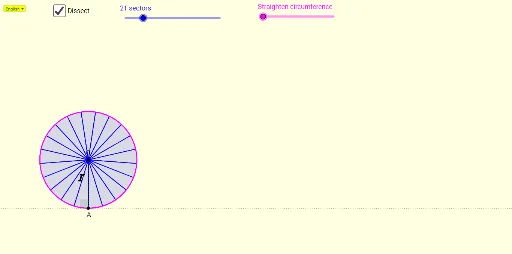
This example demonstrates how to calculate the area of a circle by dissecting it. Key mathematical concepts include the area formula of a circle and geometric construction. It uses commands such as If, Div, Line, Point, Distance, Sequence, Rotate, CircleSector, Vector, Translate, Circle, Zip, Segment, Intersect, CircleArc, Midpoint, OrthogonalLine, LineBisector, Semicircle, Angle, and SelectedIndex in GeoGebra. Suitable for middle school and above students to learn the method of calculating the area of a circle.
GeoGebra Commands & Parameters
If(r ≤ 1, 0, r - 1) → r_2Div(n, 2) → BNumLine(A, yAxis) → gPoint(g) → ODistance(A, O) → OASequence((x(A) + (t * HPj), y(A)), t, 1, CurSector) → ListHSequence((x(A) + (0.5 * HPj) + (t * HPj), y(A) + VPj), t, 0, CurSector - 1) → ListVRotate(SP4b, α / 2, SP4a) → FCircleSector(SP4a, F, SP4c) → TSektor2If(b > 1, 1, b) → kRotate(O, (((-k) * α)) / 2, A) → SP1aRotate(A, α, O) → SP0Rotate(SP0, (((-k) * α)) / 2, A) → SP1bVector(A, SP1b) → vTranslate(SP1b, Vector[((CurSector - 1) * v)]) → SP2cTranslate(SP1a, Vector[((CurSector - 1) * v)]) → SP2aRotate(A, (0.5 * α), O) → SP0bRotate(A, (1.5 * α), O) → SP0aLine(A, xAxis) → fCircle(O, A) → cRotate(SP2a, ((-h) * α), ListH(CurSector)) → SP3aRotate(SP2c, α, SP2a) → SP2bRotate(SP2b, ((-h) * α), ListH(CurSector)) → SP3bZip(CircleSector[p, q, r], p, Take[ListV, 2], q, ListH, r, Take[ListH, 2]) → ListHSectorSequence(Rotate[SP1b, (p * α), SP1a], p, 1, n - 1) → ListPSector1Zip(CircleSector[SP1a, p, q], p, Append[SP1b, ListPSector1], q, ListPSector1) → ListCSector1Sequence(Rotate[SP3b, (p * α), SP3a], p, 1, n - CurSector - 1) → ListPSector2Zip(CircleSector[SP3a, p, q], p, Append[SP3b, ListPSector2], q, ListPSector2) → ListCSector2Segment(O, A) → iIf(b ≟ n, true, false) → IsMaxCircle(A, Jejari) → dIntersect(d, g, 2) → CRotate(A, β, C) → DCircleArc(C, A, D) → eCircle(A, ((2 * π) * OA)) → pMidpoint(O, A) → EOrthogonalLine(O, g) → mCircleSector(SP2a, SP2c, SP2b) → Sektor2CircleSector(SP1a, A, SP1b) → Sektor1Zip(CircleSector[p, q, r], p, Take[ListV, 2, BNum], q, Take[ListH, 1, BNum - 1], r, Take[ListH, 2, BNum]) → ListASector1Zip(CircleSector[p, q, r], p, Take[ListV, BNum + 2], q, Take[ListH, BNum + 1], r, Take[ListH, BNum + 2]) → ListASector2If(Genap ≟ true, Midpoint[SP4a, SP4b], Midpoint[SP4a, SP4c]) → Pt1OrthogonalLine(SP4a, f) → TengahCircleSector(SP4a, SP4b, F) → TSektor1Intersect(p, f) → G, BSegment(A, B) → jIf(r > 1, 1, r) → r_1Circle(O, A) → c_1Midpoint(A, B) → MCircleSector(SP4a, SP4b, SP4c) → ASektor1Rotate(SP4a, α / 2, SP4b) → HCircleSector(SP4b, H, SP4d) → ASektor1aCircleSector(SP4b, SP4a, H) → ASektor1bRotate(ListASector2, ((r_1 * 180))°, Pt1) → ListRASectorRotate(ASektor1, ((r_1 * 180))°, Pt1) → ARSektor1Rotate(F, ((r_1 * 180))°, Pt1) → F'Rotate(SP4a, ((r_1 * 180))°, Pt1) → JSegment(J, F') → f_1LineBisector(A, SP4a) → g_1LineBisector(SP4c, O) → h_1Intersect(g_1, h_1) → IRotate(TSektor2, (r_2 * (180° - α / 2)), I) → TRSektor2Semicircle(A, SP4b) → sMidpoint(A, SP4b) → KRotate(SP4b, ((r_2 * 180))°, K) → SP4eVector(SP4b, SP4e) → tTranslate(ASektor1b, t) → ATSektor1bRotate(Sektor2, ((-h) * α), ListH(CurSector)) → Sektor3Point(f) → LAngle(O, A, L) → γSelectedIndex(Bahasa) → nnIf(nn ≟ 1, "r", "j") → text1
AI Drawing Prompt Reference
Draw a circle with center O and radius OA, then divide it into multiple sectors to demonstrate how to calculate its area by dissecting it. First, draw the circle with center O and radius OA. Then, use rotation and translation operations to divide the circle into multiple sectors, and finally show how these sectors combine to form the entire circle.
The prompt above was compiled from the original drawing commands and is for reference only.