
Area of a Triangle
Loading the math board and drawing, please wait…
In collections
Perimeter & Area
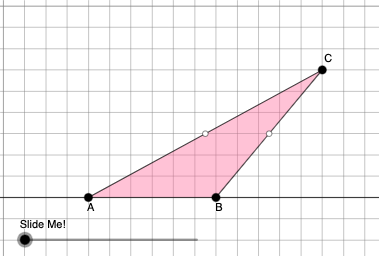
This example demonstrates how to calculate the area of a triangle using geometric constructions. Key mathematical concepts include area formulas, similar triangles, and geometric transformations. Construction involves GeoGebra commands such as Point, Polygon, OrthogonalLine, and Dilate. Suitable for middle or high school mathematics to understand geometric principles and practical applications.
GeoGebra Commands & Parameters
Point(Ray[A, A + (1, 0)]) → BPointIn(d) → CPolygon(A, B, C) → t1, f, a, bOrthogonalLine(C, g) → hIntersect(g, h) → C_{1}Midpoint(C, C_{1}) → DMidpoint(b) → EMidpoint(a) → GDilate(C, If[0 < c ≤ 1, 1 - c, 0], D) → F'Segment(C, F') → iDilate(D, If[1 < c ≤ 2, 2 - c, 0], C_{1}) → D'Segment(D, D') → jRotate(C, If[2 < c ≤ 3, ((c - 2) * π), π], D) → F'_{1}Rotate(F', If[2 < c ≤ 3, ((c - 2) * π), π], D) → F''Segment(F'_{1}, F'') → i'Dilate(E, If[0 < c ≤ 2, (0.5 * (2 - c)), 0], D) → E'Segment(E, E') → kDilate(G, If[0 < c ≤ 2, (0.5 * (2 - c)), 0], D) → G'Segment(G, G') → lAngle(C, B, A) → βAngle(B, A, C) → γPolygon(A, B, G, E) → q1, a_1, b_1, g_1, ePolygon(G, C, E) → t2, e_1, g_2, f_1Rotate(G, If[4 < c ≤ 5, ((c - 4) * π), π], E) → G'_{1}Rotate(C, If[4 < c ≤ 5, ((c - 4) * π), π], E) → F'_{2}Rotate(E, If[4 < c ≤ 5, ((c - 4) * π), π], E) → E'_{1}Polygon(G'_{1}, F'_{2}, E'_{1}) → t2', e'_{1}, g'_{1}, f'_{2}Segment(A, E) → mSegment(B, G) → nSegment(G, C) → pSegment(C, E) → qSegment(F'_{2}, E) → rSegment(E, G'_{1}) → sSegment(G'_{1}, F'_{2}) → tSegment(G, C) → h_1Segment(C, E) → i_1If(β ≟ π / 2, 5, 8) → oOrthogonalLine(B, p_1) → j_1Intersect(p_1, j_1) → HOrthogonalLine(G, g) → k_1Intersect(k_1, g) → IDilate(G, If[5 < c ≤ 6, 6 - c, 0], I) → G'_{2}Segment(G, G'_{2}) → l_1Polygon(A, I, G, G'_{1}) → q2, a_2, i_2, g_3, m_1Polygon(I, B, G) → t3, g_4, i_3, b_2Dilate(G, If[7 < c ≤ 8, 8 - c, 0], G'_{1}) → G'_{3}Vector(G, G'_{3}) → uTranslate(I, u) → I'Translate(B, u) → B'Translate(G, u) → G'_{4}Polygon(I', B', G'_{4}) → t3', g'_{4}, n_1, b'Segment(G'_{3}, I') → q_1Segment(G'_{3}, B') → r_1Dilate(B, If[5 < c ≤ 6, 6 - c, 0], H) → H'Polygon(A, B, H, G'_{1}) → q3, a_3, b_3, h_2, t_1Polygon(B, H, G) → t4, g_5, b_4, h_3Translate(B, u) → B'_{1}Translate(H, u) → H'_{1}Translate(G, u) → G'_{5}Polygon(B'_{1}, H'_{1}, G'_{5}) → t4', g'_{5}, b'_{1}, h'_{1}Segment(B'_{1}, G'_{3}) → c_1Segment(B'_{1}, H'_{1}) → d_1Segment(B, H') → s_1
AI Drawing Prompt Reference
Draw a triangle ABC, then place a point C inside the triangle and connect A, B, and C to form triangle t1. Construct a perpendicular line h from point C, find the intersection C1 with the base, and find the midpoint D of C1. Construct the midpoints E and G of AB and AC, respectively. Perform a similarity transformation on C through D to get F', and connect C and F'. Then perform a similarity transformation on D through C1 to get D', and connect D and D'. Next, rotate C and F' to form a new triangle t2. Finally, connect A, B, G, and E to form a new triangle q1.
The prompt above was compiled from the original drawing commands and is for reference only.