
Area of a Triangle: Comparing with an Equal-Base-Height Rectangle
Loading the math board and drawing, please wait…
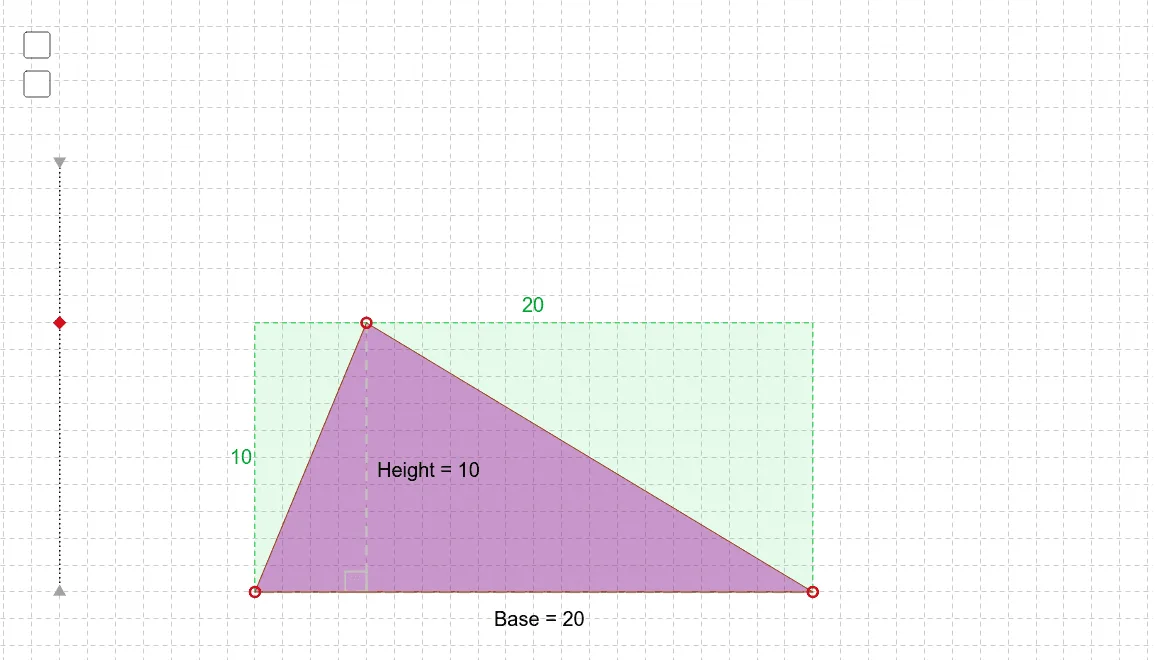
This GeoGebra example dynamically demonstrates the area of a triangle by comparing it to a rectangle with identical base and height, visually showing that the triangle's area is exactly half of the rectangle's. Core mathematical concepts include the triangle area formula, rectangle area, base-height correspondence, and area conservation. Construction highlights: using GeoGebra commands such as Segment, Point, Ray, Polygon, Midpoint, and Angle, the triangle and its circumscribing rectangle are built, with text objects displaying area values; dragging vertices allows real-time observation of area changes. Suitable for upper elementary to middle school students to grasp the derivation of the triangle area formula, and also useful for teacher demonstrations or student-led exploration of geometric area relationships.
GeoGebra Commands & Parameters
Segment(I, J) → hPoint(h) → KPoint(xAxis) → BPoint(xAxis) → ARay(A_0, B_1) → iPoint(i) → LPolygon(A, B, L) → poly1, a, b, cSegment(L, D) → dPolygon(A, A_1, B_1, B) → poly2, a_1, a_2, b_1, b_2Point(d) → ESegment(E, B) → eSegment(E, A) → fMidpoint(d) → FMidpoint(a_1) → HAngle(A, D, L) → αMidpoint(a_2) → CMidpoint(b_2) → G
AI Drawing Prompt Reference
Draw a triangle and its circumscribing rectangle sharing the same base and height. Start with a horizontal base segment, mark two endpoints for the rectangle's base, and place a third point above the base as the triangle's apex. Connect the apex to both base endpoints to form the triangle. Drop a perpendicular from the apex to the base, marking the foot, and complete the rectangle so the triangle lies inside it, with the triangle's base coinciding with the rectangle's bottom side and the apex touching the top side. Add a median from the apex to the midpoint of the base, and display the area values of both shapes, updating dynamically as vertices are dragged.
The prompt above was compiled from the original drawing commands and is for reference only.