
Area of a Circle - Wedge Geometric Proof Demo
Loading the math board and drawing, please wait…
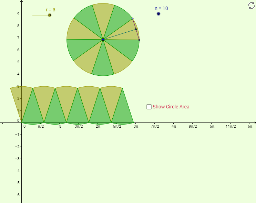
This GeoGebra interactive demonstration provides a visual, step-by-step geometric proof of the area of a circle by dividing it into equal wedge-shaped sectors and rearranging them into an approximate rectangle. The core mathematical concepts include circle area, sector geometry, limits, and informal geometric reasoning. To construct this dynamic visualization, the applet utilizes key GeoGebra commands such as `Circle`, `Polygon`, `Segment`, `Point`, `Midpoint`, and `Rotate`, alongside the powerful `Sequence` command to generate the sector vertices and lists (`list1` through `list5`) to manage the visual layers and the dynamic area display (`ShowArea`). This resource is highly suitable for secondary school geometry classrooms, interactive labs, and curriculum standards like CCSS-G-GMD-1, helping students build an intuitive bridge between visual rearrangement and algebraic formulas.
GeoGebra Commands & Parameters
Polygon((0, 0), (base, 0), (base, r), (0, r)) → poly1, a, b, c, dCircle(A, r) → ePoint(e) → BRotate(B, (360 * ° / n), A) → B'Segment(B, B') → dxMidpoint(dx) → CSegment(A, C) → dySequence(Rotate[B, ((j * 360) * ° / n), A], j, 0, n) → list1Sequence(CircleSector[A, Element[list1, j], Element[list1, j + 1]], j, 1, n, 2) → list2Sequence(CircleSector[A, Element[list1, j], Element[list1, j + 1]], j, 2, n, 2) → list3Sequence(CircleSector[((j * dx), 0), ((j * dx) + dx / 2, dy), ((j * dx) + ((-dx)) / 2, dy)], j, 0, n / 2 - 1) → list4Sequence(CircleSector[((j * dx) + dx / 2, dy), ((j * dx) + 0, 0), ((j * dx) + dx, 0)], j, 0, n / 2 - 1) → list5
AI Drawing Prompt Reference
Please draw a geometric proof demonstration of the area of a circle. First, create a rectangle and an inscribed circle. Then, divide the circle into equal wedge-shaped sectors and rearrange these sectors to form an approximate rectangle. Each sector's vertices are obtained through rotation, with midpoints connected to the center forming radius segments. Finally, display the dynamic area.
The prompt above was compiled from the original drawing commands and is for reference only.