
Area of a Circle - Wedge Demo by Linda Fahlberg-Stojanovska
Loading the math board and drawing, please wait…
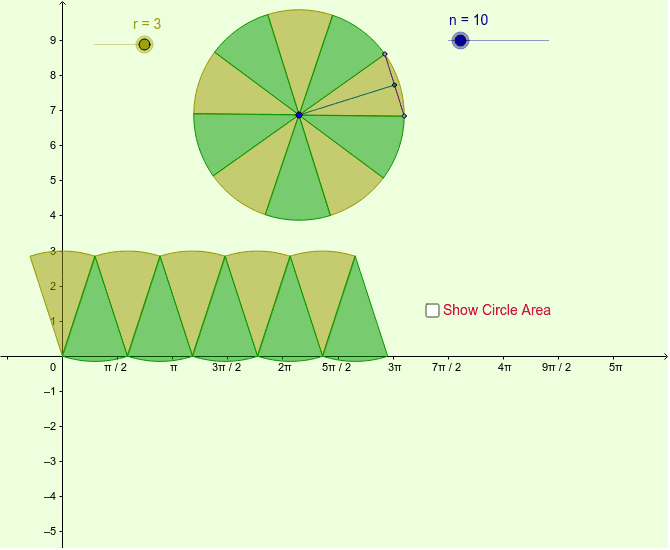
This example visually demonstrates the sector-proof of the area of a circle. Key mathematical concepts include the area formula of a circle and its proof. It utilizes commands such as Polygon, Circle, Point, Rotate, Segment, Midpoint, and Sequence in GeoGebra. Suitable for middle school and above students to learn geometric construction and area calculation.
GeoGebra Commands & Parameters
Polygon((0, 0), (base, 0), (base, r), (0, r)) → poly1, a, b, c, dCircle(A, r) → ePoint(e) → BRotate(B, 360 * ° / n, A) → B'Segment(B, B') → dxMidpoint(dx) → CSegment(A, C) → dySequence(Rotate[B, j * 360 * ° / n, A], j, 0, n) → list1Sequence(CircleSector[A, Element[list1, j], Element[list1, j + 1]], j, 1, n, 2) → list2Sequence(CircleSector[A, Element[list1, j], Element[list1, j + 1]], j, 2, n, 2) → list3Sequence(CircleSector[(j * dx, 0), (j * dx + dx / 2, dy), (j * dx + (-dx) / 2, dy)], j, 0, n / 2 - 1) → list4Sequence(CircleSector[(j * dx + dx / 2, dy), (j * dx + 0, 0), (j * dx + dx, 0)], j, 0, n / 2 - 1) → list5
AI Drawing Prompt Reference
Draw a circle and create a polygon inside it using the circle's base and two radii. Mark a point on the circle, then rotate it around the center to generate multiple equally spaced points. Connect adjacent points to form segments, and find the midpoints of these segments. Draw multiple sectors using the center and adjacent points, combining them to resemble the circle and demonstrate the area calculation process.
The prompt above was compiled from the original drawing commands and is for reference only.