
Area of a Circle: Revamped!
Loading the math board and drawing, please wait…
In collections
Geometry - Area & Volume
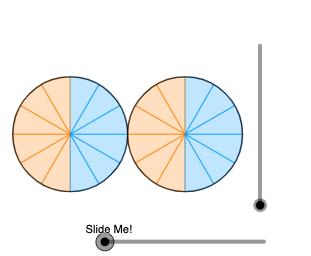
This example demonstrates how to calculate the area of a circle using geometric transformations and integration. Key mathematical concepts include the area formula of a circle, geometric transformations such as rotation and dilation, and definite integrals. Construction involves using GeoGebra commands like Sequence, Mirror, Distance, Dilate, Vector, Translate, Circle, Intersect, etc. Suitable for high school students or college students learning basic geometry and calculus.
GeoGebra Commands & Parameters
Sequence(CircleSector[(0, 0), Rotate[(2, 0), ((2 * i) * pi / n), (0, 0)], Rotate[(2, 0), ((2 * (i + 1)) * pi / n), (0, 0)]], i, 0, n, 1) → l1Sequence(Element[l1, i], i, 1, n / 4, 1) → toprSequence(Element[l1, i], i, n / 4 + 1, (2 * n / 4), 1) → toplSequence(Element[l1, i], i, (2 * n / 4) + 1, (3 * n / 4), 1) → bottomlSequence(Element[l1, i], i, (3 * n / 4) + 1, n, 1) → bottomrSequence((0, 0), i, 1, n / 4, 1) → l2Sequence((0, ((4 * i / n) * pi)), i, 1, n / 4, 1) → l3Sequence(Dilate[(0, 0), If[0 < a ≤ 1, 1 - a, 0], Element[l3, i]], i, 1, n / 4, 1) → l4Mirror(l4, (0, 0)) → l4'Sequence(Vector[(0, 0), Element[l4, i]], i, 1, n / 4, 1) → l5Sequence(Translate[Element[topr, i], Vector[Element[l5, i]]], i, 1, n / 4, 1) → l6Sequence(Rotate[Element[l6, n / 4 - i], (-(pi / 2 - (((2 * i) + 1) * pi / n))), Element[l4, n / 4 - i]], i, 0, n / 4 - 1, 1) → l7Sequence(Rotate[Element[l6, n / 4 - i], (-(pi / 2 - (((2 * i) + 1) * pi / n))), Element[l4, n / 4 - i]], i, 0, n / 4 - 1, 1) → l8Sequence(Rotate[Element[l6, n / 4 - i], If[0 < a ≤ 1, ((-(pi / 2 - (((2 * i) + 1) * pi / n))) * a), (-(pi / 2 - (((2 * i) + 1) * pi / n)))], Element[l4, n / 4 - i]], i, 0, n / 4 - 1, 1) → l9Mirror(l9, yAxis) → l9'Mirror(l9, xAxis) → l9'_{1}Mirror(l9', xAxis) → l9''Distance((0, 0), Element[l4, 1]) → bDilate((0, 0), If[1 < a ≤ 2, 2 - a, 0], Element[l4, 1]) → HVector((0, 0), H) → uTranslate(l9'_{1}, u) → l10Translate(l9'', u) → l9'''Point(yAxis) → ACircle(A, 2) → cRay(A, A - (1, 0)) → fIntersect(c, f, 1) → IRotate(I, ((-pi)) / n, A) → I'Dilate(A, If[2 < a ≤ 3, 3 - a, 0], I') → A'Vector(A, A') → vTranslate(l9, v) → l9'_{2}Translate(l10, v) → l10'Translate(topr, Vector[(4, 0)]) → topr'Translate(topl, Vector[(4, 0)]) → topl'Translate(bottoml, Vector[(4, 0)]) → bottoml'Translate(bottomr, Vector[(4, 0)]) → bottomr'Translate(eq1, Vector[(4, 0)]) → eq1'RotateText(text1, pi / 2) → text3
AI Drawing Prompt Reference
Draw a circle centered at the origin, and rotate and scale a series of sectors around the circle to form an approximation of a circle. First, draw a circle centered at the origin, then select points on the circle at equal intervals, rotate and scale the sectors around these points, and finally translate and rotate these sectors to form a complete circle.
The prompt above was compiled from the original drawing commands and is for reference only.