
Area Model of Multiplication by Scott Farrar
Loading the math board and drawing, please wait…
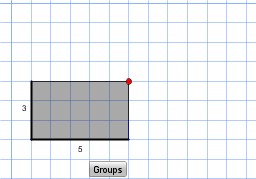
This example demonstrates how to use the area model for multiplication, showing the composition of the product through geometric partitioning. Core math concepts include multiplication decomposition, area calculation, and the combination of geometric shapes. Construction highlights involve commands like Polygon, Line, PointIn, OrthogonalLine, Intersect, and Sequence. Suitable for elementary and above grades learning multiplication, geometric area, and mathematical visualization.
GeoGebra Commands & Parameters
Polygon(E, F, G, H) → poly2, e, f, g, hLine(A, xAxis) → aLine(A, yAxis) → bPointIn(poly2) → BOrthogonalLine(B, a) → cOrthogonalLine(B, b) → dIntersect(b, d) → CIntersect(a, c) → DPolygon(A, C, B, D) → poly1, a_1, c_1, b_1, d_1PointIn(poly2) → ISequence(Segment[(x(A) + n, y(A)), (x(C) + n, y(C))], n, 1, x(B) - x(A) - 1) → list1Sequence(Segment[(x(A), y(A) + n), (x(D), y(D) + n)], n, 1, y(B) - y(A) - 1) → list2Polygon(A, C, (x(C) + 1, y(C)), (x(C) + 1, y(A))) → col, a_2, c_2, i, jPolygon(A, D, (x(D), y(D) + 1), (x(A), y(A) + 1)) → row, a_3, d_2, k, l
AI Drawing Prompt Reference
Draw a geometric diagram to demonstrate the area model of multiplication, start by creating a quadrilateral, then draw perpendicular lines from its center to the x-axis and y-axis, connect the intersections to form a smaller quadrilateral, next, draw multiple small rectangles around the larger quadrilateral to represent the decomposition of multiplication, finally, combine all parts to show the composition of the entire product.
The prompt above was compiled from the original drawing commands and is for reference only.