
Area Law Demonstration
Loading the math board and drawing, please wait…
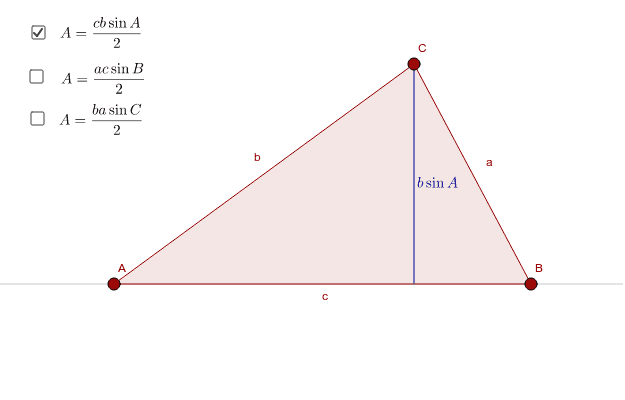
This example demonstrates the calculation and variation of polygonal area by dragging red points. It involves core mathematical concepts such as polygons, triangles, trigonometry, exponentials, piecewise functions, cones, statistical characteristics, and integers. The construction utilizes commands like Polygon, Line, OrthogonalLine, Intersect, Segment, and Midpoint from GeoGebra. Suitable for high school and above learners to understand complex geometric area calculations and function applications.
GeoGebra Commands & Parameters
Polygon(A, B, C) → poly1, c, a, bLine(A, B) → dOrthogonalLine(C, d) → eIntersect(d, e) → DSegment(C, D) → fMidpoint(f) → ELine(C, A) → gOrthogonalLine(B, g) → hIntersect(g, h) → FLine(C, B) → iOrthogonalLine(A, i) → jIntersect(i, j) → GSegment(F, B) → kSegment(A, G) → lMidpoint(k) → HMidpoint(l) → I
AI Drawing Prompt Reference
Draw a triangle ABC, then construct a polygon and line segments through points A, B, and C, followed by perpendicular lines and their intersections, and finally midpoints to form two new triangles, demonstrating the variation of polygonal area.
The prompt above was compiled from the original drawing commands and is for reference only.