
Area Between Two Ellipses
Loading the math board and drawing, please wait…
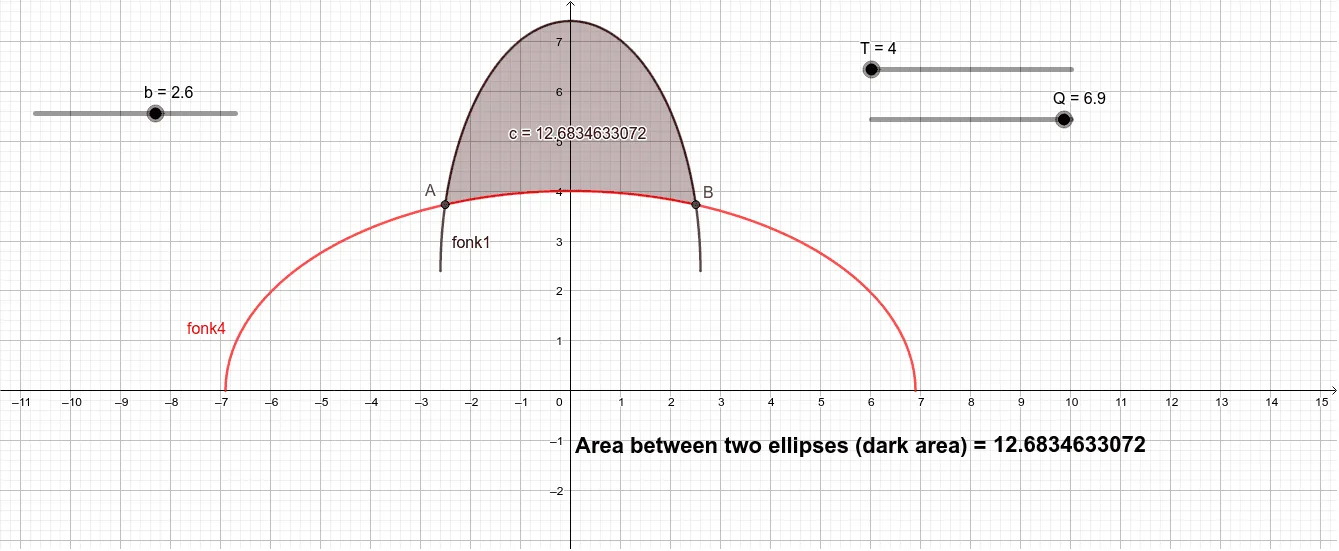
This example demonstrates how to calculate the area between two ellipses. It involves core mathematical concepts such as ellipses, integration, geometric transformations, and coordinate geometry. Key GeoGebra commands used include Intersect and IntegralBetween, along with objects like a, b, m, n, fonk1, T, Q, fonk4, A, B, c. It is suitable for high school students and above exploring area calculations of geometric figures.
GeoGebra Commands & Parameters
Intersect(fonk1, fonk4, (-2.5068055024035076, 3.726680821140329)) → AIntersect(fonk1, fonk4, (2.5068055024035076, 3.726680821140329)) → BIntegralBetween(fonk1, fonk4, x(A), x(B)) → c
AI Drawing Prompt Reference
Draw two ellipses and mark their two intersection points on the x-axis, then calculate and shade the area enclosed between the two ellipses from one intersection point to the other.
The prompt above was compiled from the original drawing commands and is for reference only.