
Area and Perimeter of a Rhomboid
Loading the math board and drawing, please wait…
In collections
geometriadinamica.es
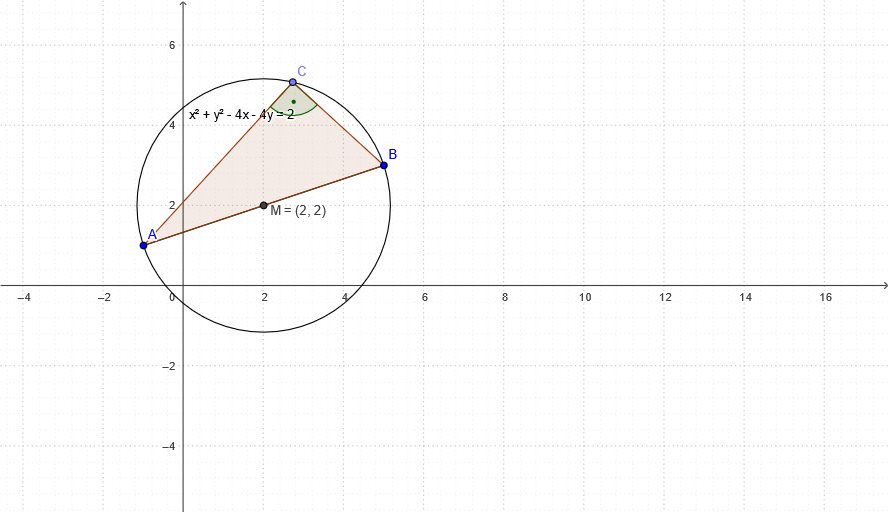
This example demonstrates how to use GeoGebra to calculate the area and perimeter of a rhomboid. A rhomboid is a quadrilateral with symmetry and equal sides. The math concepts involved include geometry and algebra. The construction involves using GeoGebra commands such as Segment, Midpoint, Circle, Point, Polygon, and Angle, and objects A, B, b, M, c, C, P, c_1, a, and b_1. This example is suitable for middle school and high school math education, particularly for teaching geometry and algebra.
GeoGebra Commands & Parameters
Segment(B, A) → bMidpoint(B, A) → MCircle(M, A) → cPoint(c) → CPolygon(A, B, C) → P, c_1, a, b_1Angle(A, C, B) → α
AI Drawing Prompt Reference
Create a plane geometry diagram illustrating a rhomboid: start with two given points as adjacent vertices and draw the segment connecting them. Find the midpoint of that segment, then draw a circle centered at the midpoint with radius equal to the distance to either endpoint, and choose a point on the circle to serve as the third key vertex. Connect the vertices in order to form the polygon representing the quadrilateral region. Finally, mark the angle at the first vertex between the other two relevant vertices using an angle label.
The prompt above was compiled from the original drawing commands and is for reference only.