
Area and Perimeter of a Rectangle by Merton Dsilva
Loading the math board and drawing, please wait…
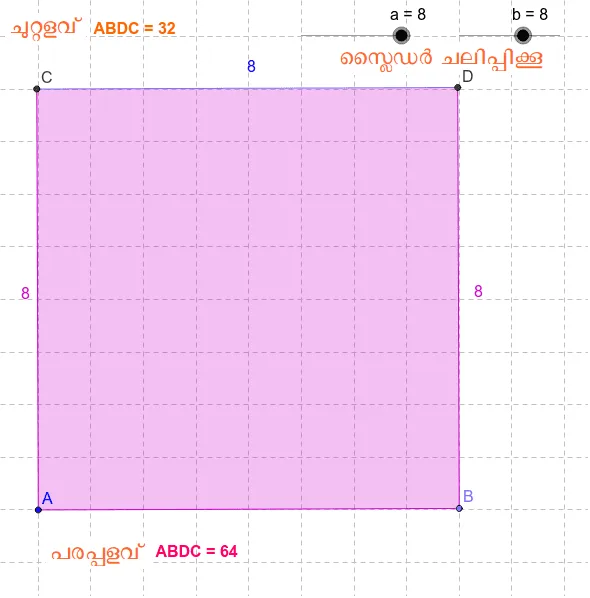
This example demonstrates the calculation of the area and perimeter of a rectangle. Key mathematical concepts include the definitions and calculation methods of area and perimeter. Using GeoGebra commands such as Point, Segment, Polygon, Distance, and Perimeter, a dynamic rectangle can be constructed and its area and perimeter can be observed. Suitable for students at the junior high school level and above to learn geometric construction and the calculation of area and perimeter.
GeoGebra Commands & Parameters
Point(Circle[A, b]) → BSegment(A, B) → a_1OrthogonalLine(A, a_1) → cOrthogonalLine(B, a_1) → dCircle(B, a) → eCircle(A, a) → fIntersect(f, c, 2) → CIntersect(e, d, 2) → DSegment(C, D) → gPolygon(A, B, D, C) → poly1, a_2, b_1, d_1, c_1Distance(b_1, d_1) → hPerimeter(poly1) → perimeterpoly1
AI Drawing Prompt Reference
Draw a dynamic rectangle by first setting a horizontal base segment. From each endpoint, construct perpendicular lines upward. Using the base length as radius, draw arcs centered at each endpoint to intersect the perpendiculars, marking the top two vertices. Connect all four vertices to form the rectangle. Then display the area and perimeter values, and show a diagonal length to verify the rectangle's properties. The figure should clearly illustrate the relationships among side lengths, area, and perimeter.
The prompt above was compiled from the original drawing commands and is for reference only.