
Arco de Herradura: Geometric and Trigonometric Application
Loading the math board and drawing, please wait…
In collections
geometriadinamica.es
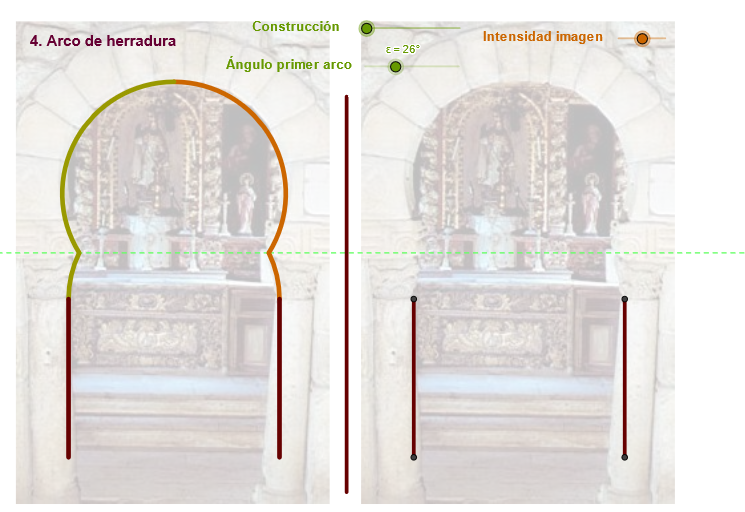
This example demonstrates the application of geometry and trigonometry through geometric construction. Key mathematical concepts include triangles, circles, angles, and vectors. Construction involves GeoGebra commands such as Segment, Midpoint, Rotate, Circle, etc. Suitable for high school students or college undergraduates to learn basic geometry and trigonometry.
GeoGebra Commands & Parameters
If(zz ≤ 0, 10, zz) → uSegment(D, B) → eMidpoint(C, D) → KRotate(C, Max[(-ε), (((-(u - 2)) * ε) * 180 / 3.14 / (2°))], K) → C'_2Circle(K, C) → f_1Midpoint(C, D) → FLine(F, e) → kIntersect(f_1, k, 1) → LCircle(L, C'_2) → g_1Center(g_1) → OIntersect(f_1, g_1, 1) → MMirror(M, k) → M'_1Midpoint(C, D) → ESegment(A, C) → dSegment(E, C) → fRotate(C, Max[((-(c - 3)) * 180 / (5°)), 180°], E) → C'Rotate(C, 359.91000000000014°, E) → C''CircumcircleArc(C, C'', C') → gSegment(C', E) → hSegment(C, F) → rMirror(D, k) → D'_1Intersect(f_1, g_1, 2) → NIntersect(g_1, k, 2) → PAngle(M, O, M'_1) → δSegment(K, C) → h_1Segment(K, C'_2) → i_1CircleArc(K, C'_2, C) → k_1Mirror(C'_2, k) → QSegment(K, Q) → l_1CircleArc(K, D, Q) → q_1CircumcircleArc(Q, O, M) → t_1Rotate(M, Min[δ / 2, ((u - 4) * δ / 8)], L) → RRotate(C, (-ε), K) → C'_3Circle(L, C'_3) → p_1CircleArc(L, M, R) → r_1Segment(L, R) → j_1Mirror(L, k) → L'Mirror(R, k) → R'Segment(L', R') → m_1Mirror(L, k) → L'_1Mirror(M, k) → M'Mirror(R, k) → R'_1Arc(Mirror[Circle[L, M], k], M', R'_1) → s_1Circle(K, C) → c_2Segment(T, T1) → n_1Mirror(D, n_1) → D'_2Mirror(B, n_1) → B'Segment(D'_2, B') → e'Mirror(A, n_1) → A'Mirror(C, n_1) → C'_4Segment(A', C'_4) → d'Vector(A, B') → zTranslate(pic1, z) → pic1'Translate(pic1, z) → pic1'_1
AI Drawing Prompt Reference
Draw a horseshoe arch formed by two intersecting circles and auxiliary lines. Start with a horizontal segment as the base, find its midpoint, and draw a large circle centered there. Construct a rotated point above the base to define the arch's starting arc. Then draw a smaller circle with another center, intersecting the large circle, and use reflection and rotation to create the symmetric arch outline. Connect key points to form triangles and segments, mark an angle, and add multiple arcs and auxiliary lines to complete the geometric and trigonometric construction.
The prompt above was compiled from the original drawing commands and is for reference only.