
Archimedes' Angle Trisection Method
Loading the math board and drawing, please wait…
In collections
Geometric Constructions
Geometric Constructions
Geometric Constructions-MINE
Geometric Constructions
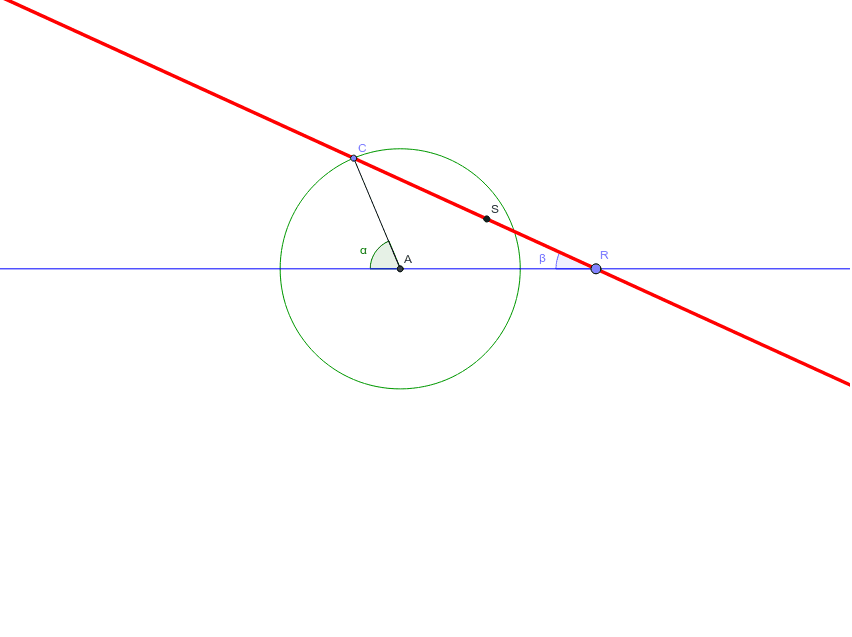
This example demonstrates Archimedes' method for trisecting an angle. Key mathematical concepts include geometric mean and angle trisection. Using commands like Intersect, Point, Circle, Segment, Line, and Angle in GeoGebra, students can visually understand the solution to this classic geometric problem. Suitable for high school geometry courses.
GeoGebra Commands & Parameters
Intersect(xAxis, yAxis) → APoint(xAxis) → GCircle(A, G) → cPoint(c) → CIntersect(c, xAxis, 2) → HSegment(C, A) → aLine(H, A) → bAngle(C, A, H) → αPoint(b) → RLine(C, R) → dCircle(R, Segment[A, G]) → eIntersect(e, d, 1) → SSegment(A, S) → fAngle(S, R, A) → βAngle(R, A, S) → γAngle(C, S, A) → δAngle(A, C, S) → ε
AI Drawing Prompt Reference
Draw a diagram for angle trisection. Start by marking the intersection point A of the x-axis and y-axis, then take point G on the x-axis. Draw a circle c with center A and passing through G. The second intersection of circle c with the x-axis is point C. Draw line segment AC, then draw line b through point H (the second intersection of circle c with the x-axis) and A, forming angle CAH. On line b, take point R, draw line CR, and draw circle e with center R and radius AC. The intersection of circle e and line CR is point S. Draw line segment AS, forming angle SRA. Finally, you will have angles SRA, RAS, and CAS, which are one-third of the original angle.
The prompt above was compiled from the original drawing commands and is for reference only.