
Arc Rotations
Loading the math board and drawing, please wait…
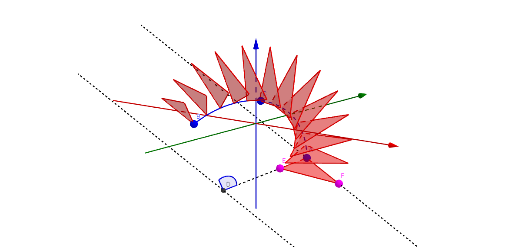
This example demonstrates the dynamic rotation of a point along an arc. It involves core math concepts like rotation, similarity transformation, unit circle, and geometric construction. Key GeoGebra commands used include CircumcircleArc, Center, OrthogonalLine, Segment, Point, Line, Angle, If, and Sequence. Suitable for high school mathematics education to understand transformations and geometric constructions.
GeoGebra Commands & Parameters
CircumcircleArc(A, C, B) → cCenter(c) → DOrthogonalLine(D, Plane[A, B, C]) → fSegment(A, D) → gPoint(Ray[D, A]) → ELine(A, f) → hPoint(h) → FAngle(B, D, A) → bIf(Length[c] > (π * g), (2 * π) - Angle[B, D, A], Angle[B, D, A]) → dAngle(B, D, A) → b'Sequence(Rotate[Rotate[Polygon[{A, E, F}], ((-d) * i), f], (a * i), Tangent[Point[c, i], c]], i, 0, 1, 1 / n) → liste2
AI Drawing Prompt Reference
Draw a dynamic rotating point on an arc ABC. First, draw the arc, then find its center D, draw the perpendicular line f through D, draw the line segment AD, take point E on the DA ray, draw the perpendicular line to f through A and take point F, calculate the angle b between B, D, and A, adjust the angle d based on the arc length, and finally rotate the triangle AEF by multiples of d to form a series of rotated triangles.
The prompt above was compiled from the original drawing commands and is for reference only.