
Arc Length and Area of a Sector: Dynamic Modifiable Template
Loading the math board and drawing, please wait…
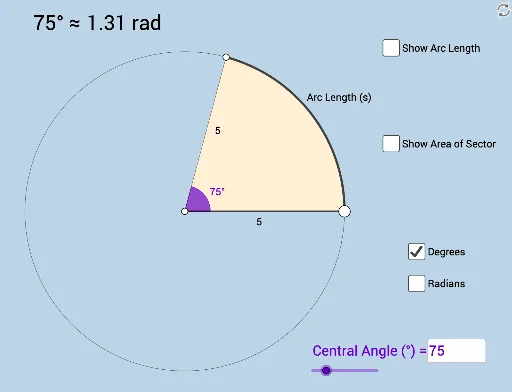
This interactive GeoGebra template dynamically demonstrates the relationship between arc length, sector area, radius, and central angle. It serves as a discovery investigation tool where users can modify parameters to see real-time updates. Core mathematical concepts include the arc length formula (l = rθ) and sector area formula (S = ½r²θ), emphasizing proportional reasoning and radian measure. The construction uses commands such as Point, Ray, Circle, Segment, Rotate, Angle, CircleArc, CircleSector, Textfield, Area, and Circumference to build the sector, display measurements, and provide input boxes for dynamic adjustment. Suitable for middle school to high school geometry classes, this template supports inquiry-based learning, helping students visualize how changing radius or central angle affects the sector's perimeter and area.
GeoGebra Commands & Parameters
Point(yAxis) → ARay(A, (1, 0)) → hPoint(h) → BCircle(A, B) → cSegment(A, B) → fRotate(B, (a * π / 180), A) → B'Angle(B, A, B') → αCircleArc(A, B, B') → dSegment(A, B') → gCircleSector(A, B, B') → eTextfield(a) → InputBox1Area(c) → lCircumference(c) → mTextfield(n) → InputBox2