
Any Prism's Base Cannot Be a Crossed Polygon, but Can Be Concave
Loading the math board and drawing, please wait…
In collections
Nets of Solids
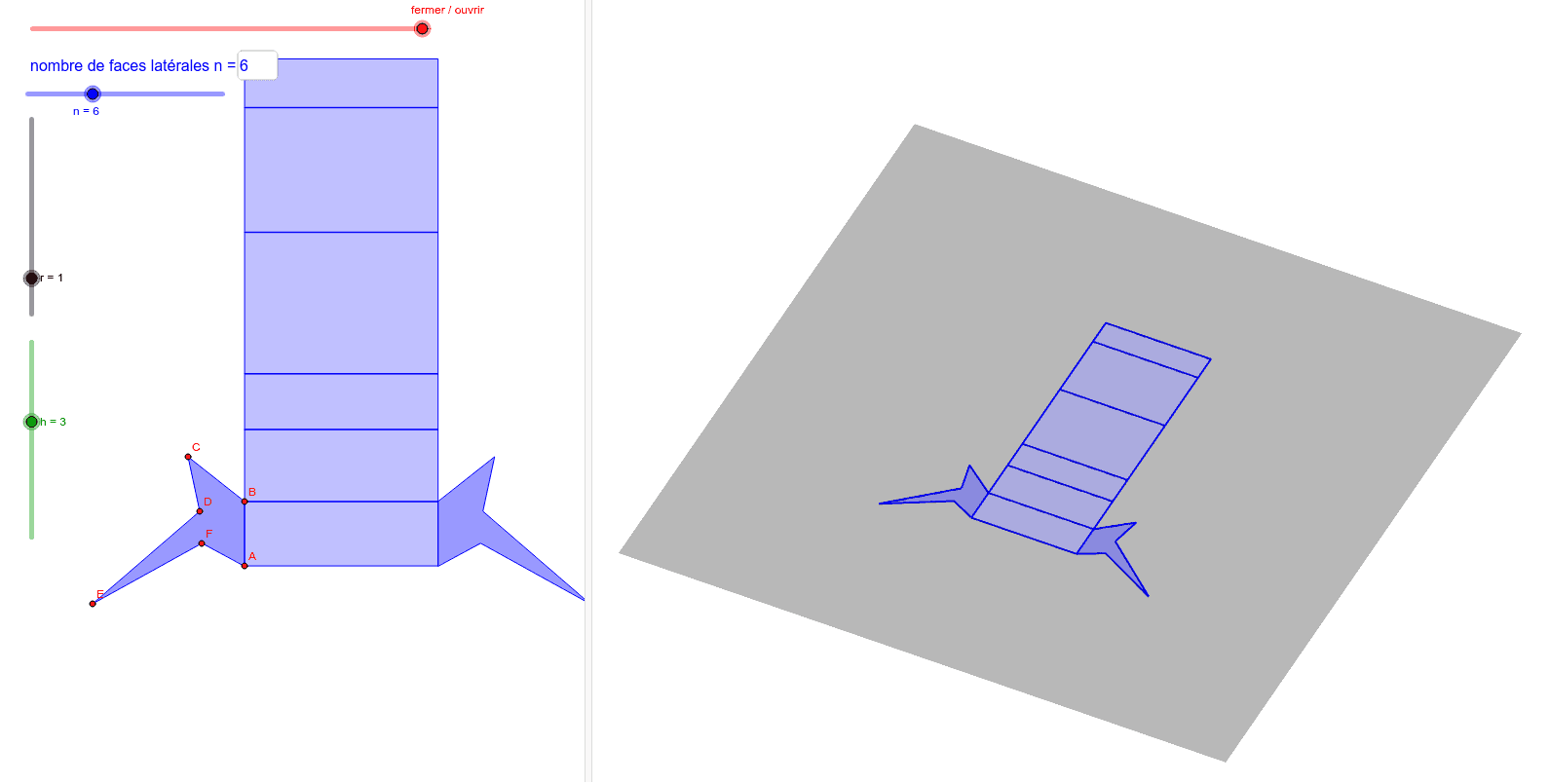
This example demonstrates how to construct an arbitrary prism's base, emphasizing that the base cannot be a crossed polygon but can be concave. The key mathematical concepts involve polygon geometry, solid geometry, and geometric construction. The construction involves GeoGebra commands such as First, Append, Sequence, Rotate, Element, Last, Translate, Polygon, Prism, etc. to create the base and prism. Suitable for middle or high school students learning geometric construction and solid geometry concepts.
GeoGebra Commands & Parameters
First({A, B, C, D, E, F, G, H, I, J, K, L}, n) → P_0Append(Append[P_0, A], B) → PSequence(Distance[Element[P, i], Element[P, i + 1]], i, 1, n) → LongSequence((0, Sum[First[Long, i]]), i, 1, n) → FL_1Sequence((0, y(Element[P, i]), (-x(Element[P, i]))), i, 1, n + 1) → P_1Sequence(If[p < i - 1, 0, If[p < i, p - floor(p), 1]], i, 1, n + 1) → LpRotate(P_1, ((-Element[Lp, 2]) * (π - Angle[Element[P, 1], Element[P, 2], Element[P, 3], xOyPlane])), Line[Element[FL_1, 1], xAxis]) → P_2Rotate(P_2, ((-Element[Lp, 3]) * (π - Angle[Element[P, 2], Element[P, 3], Element[P, 4], xOyPlane])), Line[Element[FL_1, 2], xAxis]) → P_3Rotate(P_3, ((-Element[Lp, 4]) * (π - Angle[Element[P, 3], Element[P, 4], Element[P, 5], xOyPlane])), Line[Element[FL_1, 3], xAxis]) → P_4Rotate(P_4, ((-Element[Lp, 5]) * (π - Angle[Element[P, 4], Element[P, 5], Element[P, 6], xOyPlane])), Line[Element[FL_1, 4], xAxis]) → P_5Rotate(P_5, ((-Element[Lp, 6]) * (π - Angle[Element[P, 5], Element[P, 6], Element[P, 7], xOyPlane])), Line[Element[FL_1, 5], xAxis]) → P_6Rotate(P_6, ((-Element[Lp, 7]) * (π - Angle[Element[P, 6], Element[P, 7], Element[P, 8], xOyPlane])), Line[Element[FL_1, 6], xAxis]) → P_7Rotate(P_7, ((-Element[Lp, 8]) * (π - Angle[Element[P, 7], Element[P, 8], Element[P, 9], xOyPlane])), Line[Element[FL_1, 7], xAxis]) → P_8Rotate(P_8, ((-Element[Lp, 9]) * (π - Angle[Element[P, 8], Element[P, 9], Element[P, 10], xOyPlane])), Line[Element[FL_1, 8], xAxis]) → P_9Rotate(P_9, ((-Element[Lp, 10]) * (π - Angle[Element[P, 9], Element[P, 10], Element[P, 11], xOyPlane])), Line[Element[FL_1, 9], xAxis]) → P_10Rotate(P_10, ((-Element[Lp, 11]) * (π - Angle[Element[P, 10], Element[P, 11], Element[P, 12], xOyPlane])), Line[Element[FL_1, 10], xAxis]) → P_11Rotate(P_11, ((-Element[Lp, 12]) * (π - Angle[Element[P, 11], Element[P, 12], Element[P, 13], xOyPlane])), Line[Element[FL_1, 11], xAxis]) → P_12Element(LR, n) → PPLast(PP, n + 1 - floor(p)) → PRTranslate(PR, Vector[(h, 0, 0)]) → QSequence(Polygon[Element[PR, i], Element[Q, i], Element[Q, i + 1], Element[PR, i + 1]], i, 1, Length[PR] - 1) → faceMobAppend(A, First[FL_1, floor(p)]) → FL_2Translate(FL_2, Vector[(h, 0, 0)]) → FL_3Sequence(Polygon[Element[FL_2, i], Element[FL_2, i + 1], Element[FL_3, i + 1], Element[FL_3, i]], i, 2, Length[FL_2] - 1) → faceFixPolygon((0, 0, 0), Element[FL_2, 2], Element[FL_3, 2], (h, 0, 0)) → poly1, c, d, e, fPolygon(Sequence[(x(Element[P_0, i]), y(Element[P_0, i])), i, 1, n]) → poly2Prism(poly2, h) → pri, M, Z, A_1, B_1, face1, face3, face4, face5, face6, face7, face8, N, face9, face10, face11, face12, face2, face13, arête1, arête2, arête3, arête4, O, arête5, arête6, arête7, arête8, arête9, arête10, arête11, arête12, arêteMN, arêteNO, R, arêteOR, arêteRS, arêteST, arêteTU, arêteUV, arêteVW, arêteWZ, arête14, arête15, arête13, S, T, U, V, WRotate(pri, (Element[Lp, 1] * π / 2), yAxis) → pri'Rotate(face13, (Element[Lp, 1] * π / 2), yAxis) → face13'Rotate(face13', (Element[Lp, 2] * π / 2), Line[(h, 0, 0), yAxis]) → face13''Textfield(n) → ChampTexte1