
Another Turn of the Screw
Loading the math board and drawing, please wait…
In collections
geometriadinamica.es
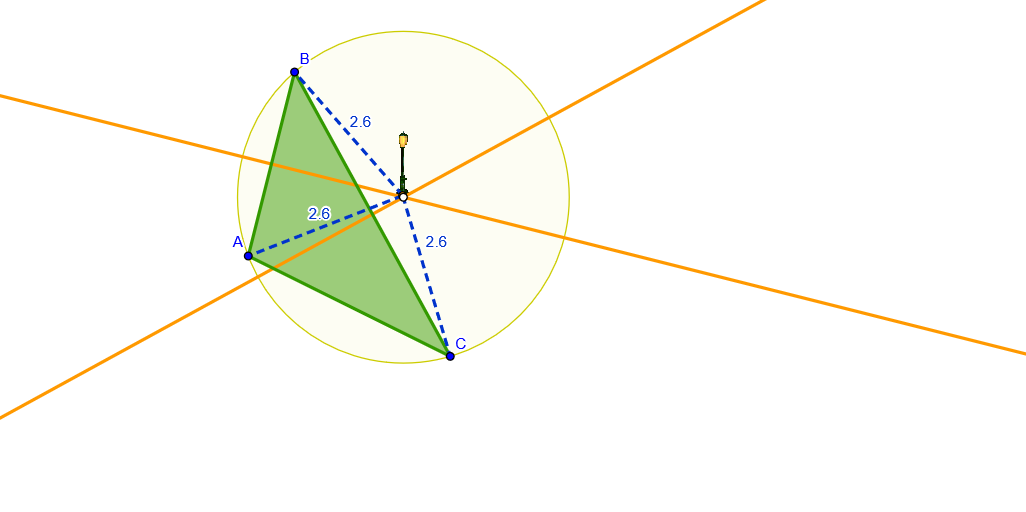
This GeoGebra example demonstrates how to draw a spiral graph. It involves the core mathematical concepts of complex numbers and circles. The construction points include using Polygon, Segment, LineBisector, Intersect, and Circle GeoGebra commands. This example is suitable for high school mathematics students or professionals who need to understand spiral graphs.
GeoGebra Commands & Parameters
Polygon(A, B, C) → poly1, c, a, bSegment(D, B) → dSegment(D, A) → eSegment(D, C) → fLineBisector(a) → gLineBisector(c) → hLineBisector(c) → iLineBisector(a) → jIntersect(i, j) → ECircle(E, B) → k
AI Drawing Prompt Reference
Draw a spiral by first forming a triangle with points A, B, and C, then connecting point D to each vertex of the triangle. Next, draw the perpendicular bisectors of sides AB and AC, and let their intersection be point E. Finally, draw a circle with center E and radius EB.
The prompt above was compiled from the original drawing commands and is for reference only.