
Animation to Show Trapezoid Area
Loading the math board and drawing, please wait…
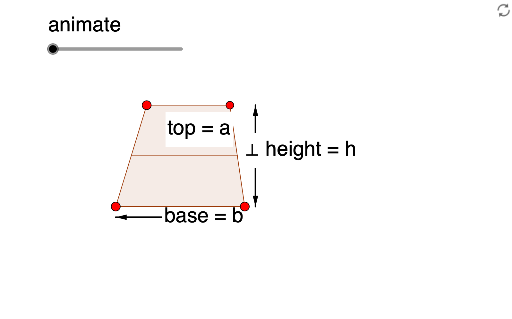
This example demonstrates the area calculation of a trapezoid through animation. It involves core math concepts like trapezoids, similar triangles, equations, definite integrals, linear regression, and bar charts. Constructed using GeoGebra commands such as Point, Sort, Element, DynamicCoordinates, Midpoint, If, Vector, Translate, Rotate, Semicircle, LaTeX, and Polygon. Suitable for high school mathematics education to visually explain the trapezoid area formula and integral applications.
GeoGebra Commands & Parameters
Point(xAxis) → HPoint(xAxis) → ISort({H, I}) → list1Element(list1, 1) → AElement(list1, 2) → BDynamicCoordinates(K, Min[Max[x(K), x(A)], x(B)], y(K)) → LMidpoint(L, I) → DIf(animate > 0.5, (2 * animate) - 1, 0) → animate2DynamicCoordinates(P, Min[Max[x(P), x(A)], x(B)], y(L)) → TMidpoint(T, H) → EVector(E, (x(H), y(E))) → bTranslate(E, Vector[(b * animate2)]) → E'_1Rotate(L, ((If[animate < 0.5, animate, 0.5] * 2) * π), D) → L'Rotate(D, ((If[animate < 0.5, animate, 0.5] * 2) * π), D) → D'_1Rotate(T, ((If[animate < 0.5, animate, 0.5] * 2) * π), D) → T'Rotate(E, ((If[animate < 0.5, animate, 0.5] * 2) * π), D) → E'Translate(E', Vector[(b * animate2)]) → E''Semicircle(C, B) → dPoint(d, 1 - animate) → GVector(H - (0, 1), I - (0, 1)) → uVector(I - (0, 1), H - (0, 1)) → vVector(J, M) → wVector(M, J) → jVector(N, J) → kVector(J, N) → lLaTeX("\frac{h}{2}") → text3DynamicCoordinates(P, Min[Max[x(K), x(A)], x(B)], y(K)) → QPolygon(D, E, T, L) → poly1, p, q, r, sRotate(D, (animate * π), D) → D'Polygon(I, H, E'_1, D) → poly2, h, i, m, nRotate(L, (animate * π), D) → K'Polygon(D'_1, E'', T', L') → poly1', t, c, e, f_1LaTeX("Area = \frac{h}{2}(a+b)") → text4Vector(E) → aIf(animate < 0.5, animate, 0.5) → animate1Midpoint(L', T') → SMidpoint(T', H) → FVector(H - (0, 1), T' - (0, 1)) → fVector(T' - (0, 1), H - (0, 1)) → g