
Animation of Triangle Angle Sum
Loading the math board and drawing, please wait…
In collections
Introduction to Geometry
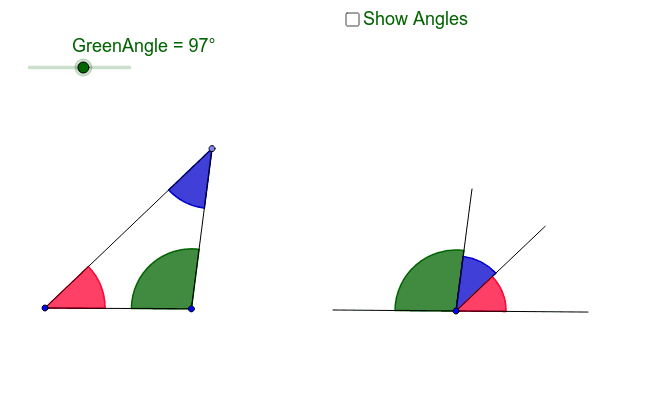
This example demonstrates the sum of the angles in a triangle using an animation. By adjusting one angle with a slider, the two vertices of the triangle can be moved. It illustrates that the sum of the angles in a triangle is always 180 degrees. GeoGebra commands used include Line, Point, Segment, Rotate, and Angle. Suitable for middle school and above students to learn geometric construction and triangle properties.
GeoGebra Commands & Parameters
Line(C, D) → hPoint(h) → BSegment(B, A) → aRotate(C, -GreenAngle, D) → C'Angle(C', D, C) → αSegment(C, D) → dSegment(D, C') → fRotate(A, -GreenAngle, B) → A'Angle(A', B, A) → βLine(B, A') → bPoint(b) → ESegment(A, E) → cSegment(E, B) → eAngle(A, E, B) → γAngle(B, A, E) → δRotate(C', -γ, D) → C''Angle(C'', D, C') → εLine(D, C'') → gPoint(h) → FAngle(F, D, C'') → ζSegment(C'', D) → iSegment(D, F) → j
AI Drawing Prompt Reference
Draw a triangle with a slider to adjust one angle, demonstrating the sum of interior angles is always 180 degrees. As the angle changes, move the other two vertices and connect them to form sides. Rotate one angle to the extension of the opposite side, creating an exterior angle to verify the sum of interior angles equals 180 degrees.
The prompt above was compiled from the original drawing commands and is for reference only.