
Animation Demonstrating Geometry and Calculus Concepts
Loading the math board and drawing, please wait…
In collections
Geometry Review
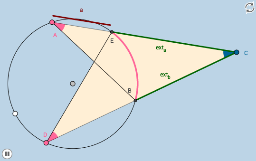
This example demonstrates geometric relationships and calculus properties between circles and function graphs through animation; involves core concepts like circle, statistical characteristics, integral, conditional probability, inequalities, geometric mean; constructed using commands such as Circle, Segment, PointIn, Tangent, Intersect, CircleArc, Point, Dilate, CircleSector, Line, Angle, Vector, Translate, Rotate, Polygon, OrthogonalLine; suitable for high school students and math enthusiasts to understand geometric constructions and calculus applications.
GeoGebra Commands & Parameters
Circle(A_1, B_1) → cSegment(A_1, B_1) → fPointIn(a_2) → CTangent(C, c) → g, hIntersect(c, g) → D_1Intersect(c, h) → E_1CircleArc(A_1, D_1, E_1) → dPoint(d) → ACircleArc(A_1, D_1, A) → eCircleArc(A_1, A, E_1) → kPoint(k) → DCircleArc(A_1, E_1, D_1) → pSegment(C, A) → iSegment(C, D) → jIntersect(p, i, 1) → EIntersect(p, j, 1) → BSegment(D, E) → lSegment(B, A) → mCircleArc(A_1, B, E) → qCircleArc(A_1, E, D_1) → rCircleArc(A_1, E_1, B) → sCircle(D, (0.2 * f)) → tCircle(A, (0.2 * f)) → c_1Intersect(t, j, 1) → JIntersect(t, l, 1) → KDilate(D, If[0 < b_2 ≤ 1, 1 - b_2, 0], E) → G'Segment(D, G') → nDilate(B, If[1 < b_2 ≤ 2, 2 - b_2, 0], A) → I'Segment(B, I') → f_1CircleSector(D, J, K) → d_1Line(A, n) → g_1Intersect(c_1, g_1, 2) → LIntersect(c_1, i, 1) → MAngle(M, A, L) → αDilate(D, If[2 < b_2 ≤ 3, 3 - b_2, 0], A) → G'_1Vector(D, G'_1) → uTranslate(d_1, u) → e_1Rotate(e_1, If[3 < b_2 ≤ 4, ((-(b_2 - 3)) * α), (-α)], A) → h_1Circle(C, (0.2 * f)) → k_1Intersect(k_1, j, 1) → NIntersect(k_1, i, 1) → OCircleSector(C, O, N) → p_1Segment(A, E) → i_1Segment(E, C) → j_1Segment(D, B) → l_1Segment(B, C) → m_1Polygon(D, C, E) → poly1, h_2, g_2, c_2OrthogonalLine(E, i_1) → n_1OrthogonalLine(B, l_1) → q_1Circle(E, (0.1 * f)) → r_1Circle(B, (0.1 * f)) → s_1Intersect(s_1, q_1, 1) → PIntersect(r_1, n_1, 2) → QLine(Q, i_1) → t_1Line(P, l_1) → a_1OrthogonalLine(A, t_1) → b_1OrthogonalLine(C, t_1) → f_2OrthogonalLine(D, a_1) → i_2OrthogonalLine(C, a_1) → j_2Intersect(t_1, b_1) → RIntersect(t_1, f_2) → SIntersect(a_1, j_2) → TIntersect(a_1, i_2) → UDilate(R, If[4 < b_2 ≤ 5, 5 - b_2, 0], S) → R'Segment(R, R') → aPolygon(A, C, B) → poly2, i_3, f_3, c_3Dilate(U, If[5 < b_2 ≤ 6, 6 - b_2, 0], T) → U'Segment(U, U') → bSegment(C, E) → k_2Segment(C, B) → l_2CircleArc(A_1, B, E) → d_2
AI Drawing Prompt Reference
Create an animation demonstrating the geometric relationships and calculus properties between circles and function graphs. Start by drawing a circle and marking a point on it. Then, find the tangent lines at that point and their intersections with the circle. Use these points to construct arcs and segments. Further build multiple arcs, segments, and triangles. Apply dilation and translation using vectors. Finally, combine these elements into a complex geometric figure to showcase geometric constructions and calculus applications.
The prompt above was compiled from the original drawing commands and is for reference only.