
Pythagorean Theorem Application: Drawing Real Numbers
Loading the math board and drawing, please wait…
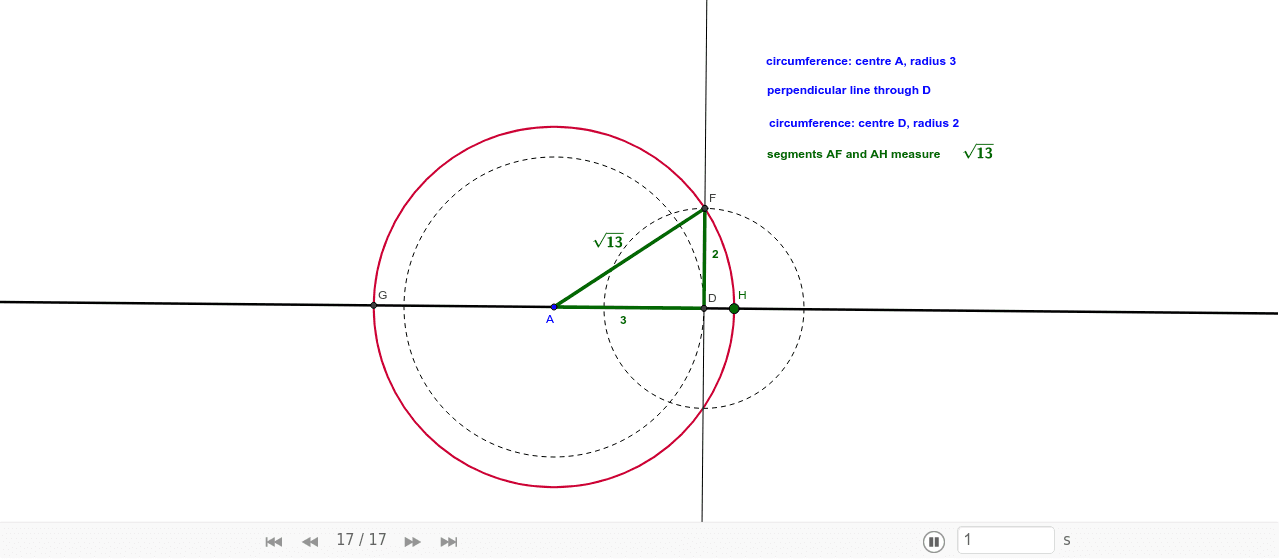
This example dynamically demonstrates the Pythagorean theorem in calculating real numbers through a right triangle. Key math concepts include the Pythagorean theorem, right triangles, and real number representation. GeoGebra commands like Line, Circle, Intersect, Segment, and OrthogonalLine are used to construct the geometry. Suitable for high school mathematics education, illustrating the connection between geometry and algebra.
GeoGebra Commands & Parameters
Line(A, B) → aCircle(A, 3) → cIntersect(c, a) → C, DSegment(A, D) → gOrthogonalLine(D, a) → bCircle(D, 2) → dIntersect(d, b) → E, FSegment(D, F) → hSegment(A, F) → fCircle(A, F) → eIntersect(e, a) → G, H
AI Drawing Prompt Reference
Draw a right triangle with one leg as a reference, then draw a circle with radius 3 centered on the endpoint of this leg. Let the circle intersect the leg at two points. Connect these points to the opposite vertex. Next, draw a circle with radius 2 centered on one of the intersection points, intersecting the previous line at two new points. Connect these points to the intersection point. Finally, draw two circles centered on the opposite vertex and the intersection point, intersecting the leg at two points each. Connect these intersection points to the vertex and the intersection point to illustrate the Pythagorean theorem.
The prompt above was compiled from the original drawing commands and is for reference only.