
Draw Real Numbers (3)
Loading the math board and drawing, please wait…
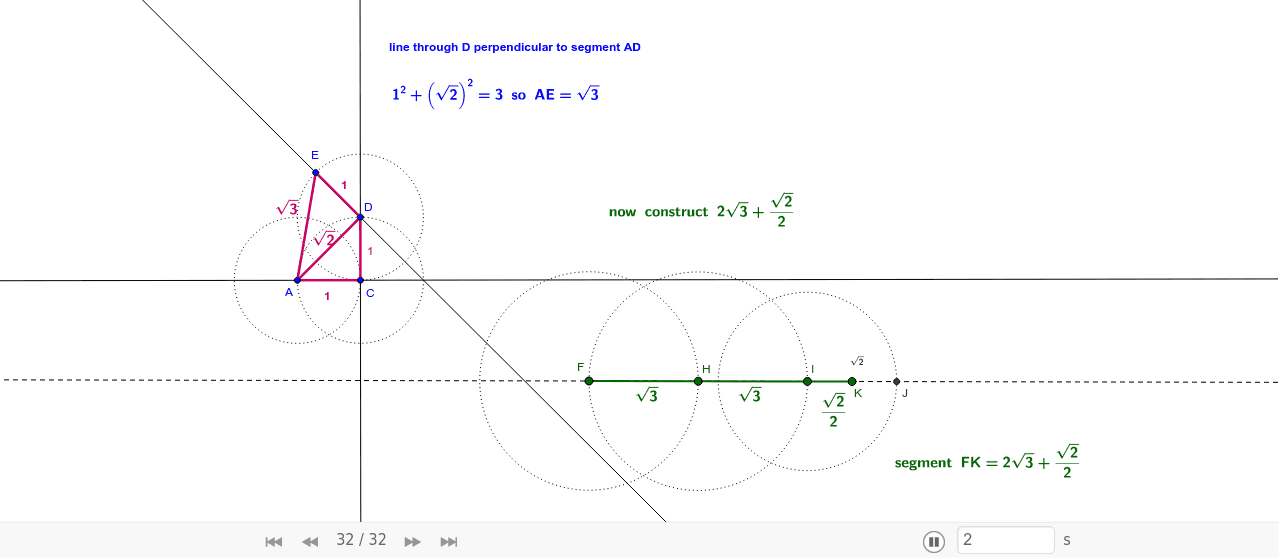
This example demonstrates the operation and representation of rational and irrational numbers. It involves core math concepts like real number classification, geometric representation, and coordinate geometry operations. Construction highlights include using GeoGebra commands such as Line, Circle, Intersect, Segment, OrthogonalLine, and Midpoint to build geometric models. Suitable for high school mathematics teaching to understand the connection between real numbers and geometric figures, enhancing computational skills.
GeoGebra Commands & Parameters
Line(A, B) → aCircle(A, 1) → cIntersect(c, a, 2) → CSegment(A, C) → bOrthogonalLine(C, a) → dCircle(C, 1) → eIntersect(e, d, 2) → DSegment(C, D) → fSegment(A, D) → gOrthogonalLine(D, g) → hCircle(D, 1) → kIntersect(k, h, 2) → ESegment(D, E) → iSegment(A, E) → jLine(F, G) → lCircle(F, j) → pIntersect(p, l, 2) → HSegment(F, H) → mCircle(H, m) → qIntersect(q, l, 2) → ISegment(H, I) → nCircle(I, g) → rIntersect(r, l, 2) → JMidpoint(I, J) → KSegment(I, K) → s
AI Drawing Prompt Reference
Draw a geometric figure involving lines and circles to represent rational and irrational numbers. Start by drawing a line and a unit circle centered at one endpoint of the line, connecting the intersection points. Then, draw a perpendicular line from the intersection point and another unit circle based on this line, connecting the new intersection points. Repeat this process to build multiple geometric objects, and finally connect specific points to form a closed shape, demonstrating the connection between numbers and shapes.
The prompt above was compiled from the original drawing commands and is for reference only.