
Animation Demonstrating Circumcircle and Similarity Transformation
Loading the math board and drawing, please wait…
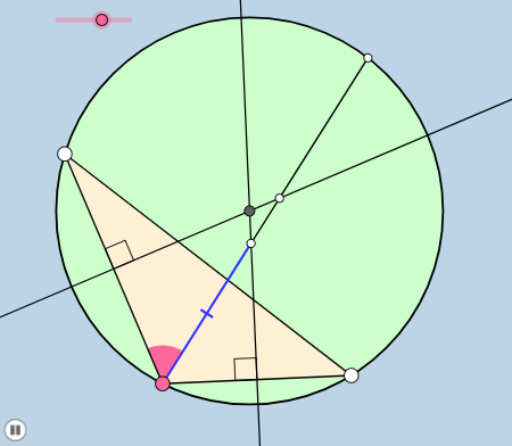
This example animates the circumcircle of a general quadrilateral and its similarity transformation. Key math concepts include circumcircle, similarity transformation, indefinite integral, and continuity. Construction highlights involve commands like Rotate, Segment, Circle, Intersect, and Dilate. Suitable for high school and above, aiding in understanding geometric transformations and calculus concepts.
GeoGebra Commands & Parameters
Rotate(A, (a * π / 180), B) → A'Angle(A, B, A') → αSegment(A, B) → fRay(B, A') → gPoint(g) → CSegment(C, A) → hRotate(A, α / 2, B) → A'_1Angle(A, B, A'_1) → βRay(B, A'_1) → iSegment(B, C) → jMin({f, j}) → bCircle(B, (0.2 * b)) → cIntersect(c, f) → D,Intersect(c, i) → E,CircleSector(B, D, E) → dLineBisector(f) → kLineBisector(j) → lIntersect(l, k) → OCircle(O, C) → eDilate(O, If[0 < m ≤ 1, 1 - m, 0], C) → F'Segment(O, F') → nRotate(C, If[1 < m ≤ 3, ((m - 1) * π), (2 * π)], O) → C'CircleArc(O, C, C') → pRotate(C, If[1 < m ≤ 3, ((m - 1) * π), (2 * π)], O) → C'_1Rotate(O, If[1 < m ≤ 3, ((m - 1) * π), (2 * π)], O) → F'_1Rotate(F', If[1 < m ≤ 3, ((m - 1) * π), (2 * π)], O) → F''Segment(F'_1, F'') → n'Intersect(e, i) → G, HOrthogonalLine(O, f) → qIntersect(i, q) → IIntersect(f, q) → FOrthogonalLine(O, j) → rIntersect(j, r) → JIntersect(r, i) → KDistance(B, K) → distanceBKDistance(H, I) → distanceHIDilate(B, If[4 < m ≤ 5, 5 - m, 0], I) → B'Segment(B, B') → sIntersect(c, f, 1) → LRotate(L, If[5 < m ≤ 6, ((m - 5) * β), β], B) → L'CircleSector(B, L, L') → tRotate(d, If[7 < m ≤ 8, ((m - 7) * β), β], B) → d'Angle(O, J, C) → γAngle(O, F, B) → δDilate(I, If[5 < m ≤ 6, 6 - m, 0], K) → I'Segment(I, I') → f_1Dilate(O, If[8 < m ≤ 9, 9 - m, 0], I) → O'Segment(O, O') → g_1Dilate(I, If[9 < m ≤ 10, 10 - m, 0], F) → I'_1Segment(I, I'_1) → h_1Dilate(O, If[10 < m ≤ 11, 11 - m, 0], K) → O'_1Dilate(O, If[10 < m ≤ 11, 11 - m, 0], J) → O'_2Segment(O, O'_1) → i_1Segment(O, O'_2) → j_1Segment(B, I) → k_1Dilate(K, If[6 < m ≤ 7, 7 - m, 0], H) → K'Segment(K, K') → l_1Midpoint(I, K) → MRotate(B, If[11.5 < m ≤ 12.5, ((-(m - 11.5)) * π), (-π)], M) → B'_1Rotate(I, If[11.5 < m ≤ 12.5, ((-(m - 11.5)) * π), (-π)], M) → I'_2Segment(B'_1, I'_2) → m_1Circle(O, C) → eePolygon(B, A, C) → poly1, c_1, b_1, a_1
AI Drawing Prompt Reference
Draw a quadrilateral with one fixed side and another side rotating around a fixed endpoint, creating a dynamic similarity transformation. Show the circumcircle of the quadrilateral and the rotation path of points on the circle. Construct the circumcenter and draw segments from it to vertices. Add a slider to control rotation angle and scaling, making the figure animate. Display intersections of the circumcircle with rotating rays, construct perpendiculars, and mark relevant distances. Finally, use sectors and arcs to represent rotation, and label angles.
The prompt above was compiled from the original drawing commands and is for reference only.