
Animation 31: Properties of a Rectangle
Loading the math board and drawing, please wait…
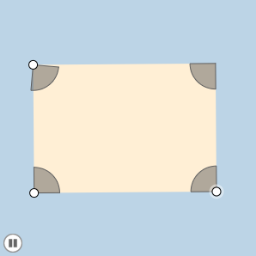
This example demonstrates the properties of a rectangle, including angles, side lengths, and area. Using GeoGebra commands such as Segment, Angle, and Polygon, the transformation process of the rectangle can be dynamically shown. Suitable for middle and high school students to learn geometric transformations and probability statistics.
GeoGebra Commands & Parameters
Segment(A, B) → aSlope(a) → cOrthogonalLine(A, a) → ePoint(e) → CRay(A, C) → dPoint(d) → DSegment(A, D) → fLine(D, a) → gLine(B, f) → hIntersect(g, h) → ESegment(D, E) → iSegment(E, B) → jMidpoint(A, E) → FCircle(A, (0.2 * Min[f, i])) → kIntersect(k, f) → G,Intersect(k, a, 1) → HDilate(A, If[0 < l ≤ 1, 1 - l, 0], B) → A'Vector(A, A') → uCircleSector(A, H, G) → pTranslate(p, u) → p'Rotate(p', If[1 < l ≤ 2, ((l - 1) * π / 2), 1.5707963267948966], B) → p''Dilate(B, If[2 < l ≤ 3, 3 - l, 0], E) → B'Vector(B, B') → vTranslate(p'', v) → p'''Rotate(p''', If[3 < l ≤ 4, ((l - 3) * π / 2), 1.5707963267948966], E) → qDilate(E, If[4 < l ≤ 5, 5 - l, 0], D) → E'Vector(E, E') → wTranslate(q, w) → q'Rotate(q', If[5 < l ≤ 6, ((l - 5) * π / 2), 1.5707963267948966], D) → q''Dilate(D, If[6 < l ≤ 7, 7 - l, 0], F) → D'Vector(D, D') → mSegment(D, D') → nDilate(F, If[7 < l ≤ 8, 8 - l, 0], B) → F'Segment(F, F') → rDilate(A, If[8 < l ≤ 9, 9 - l, 0], F) → A'_1Segment(A, A'_1) → sDilate(F, If[9 < l ≤ 10, 10 - l, 0], E) → F'_1Segment(F, F'_1) → tPolygon(A, B, E, D) → poly1, a_1, b_1, e_1, d_1Angle(E, F, D) → αAngle(B, A, F) → γAngle(F, A, D) → δRotate(F, If[10 < l ≤ 11, ((l - 10) * α), α], F) → F'_2Rotate(F'_1, If[10 < l ≤ 11, ((l - 10) * α), α], F) → ISegment(F'_2, I) → t'Rotate(F'_2, If[11 < l ≤ 12, ((l - 11) * (π - α)), π - α], F) → JRotate(I, If[11 < l ≤ 12, ((l - 11) * (π - α)), π - α], F) → I'Segment(J, I') → t''Rotate(J, If[12 < l ≤ 13, ((l - 12) * α), α], F) → J'Rotate(I', If[12 < l ≤ 13, ((l - 12) * α), α], F) → I''Segment(J', I'') → t'''Segment(A, F) → c_1Intersect(k, c_1) → K,CircleSector(A, H, K) → f_1CircleSector(A, K, G) → g_1Dilate(A, If[16 < l ≤ 17, 17 - l, 0], E) → A'_2Dilate(A, If[16 < l ≤ 17, 17 - l, 0], B) → A'_3Dilate(A, If[16 < l ≤ 17, 17 - l, 0], D) → A'_4Vector(A, A'_3) → u_1Vector(A, A'_2) → v_1Vector(A, A'_4) → w_1Translate(f_1, u_1) → h_1Translate(f_1, v_1) → k_1Translate(f_1, w_1) → p_1Rotate(h_1, If[17 < l ≤ 18, ((l - 17) * (π / 2 + δ)), π / 2 + δ], B) → q_1Rotate(p_1, If[17 < l ≤ 18, ((l - 17) * ((3 * π / 2) + δ)), (3 * π / 2) + δ], D) → r_1Rotate(k_1, If[17 < l ≤ 18, ((l - 17) * π), 3.141592653589793], E) → s_1Dilate(A, If[18 < l ≤ 19, 19 - l, 0], E) → A'_5Dilate(A, If[18 < l ≤ 19, 19 - l, 0], D) → A'_6Dilate(A, If[18 < l ≤ 19, 19 - l, 0], B) → A'_7Vector(A, A'_7) → i_1Vector(A, A'_5) → j_1Vector(A, A'_6) → l_1Translate(g_1, l_1) → t_1Translate(g_1, j_1) → c_2Translate(g_1, i_1) → d_2Rotate(d_2, If[19 < l ≤ 20, ((l - 19) * δ), δ], B) → e_2Rotate(c_2, If[19 < l ≤ 20, ((-(l - 19)) * π), -3.141592653589793], E) → f_2Rotate(t_1, If[19 < l ≤ 20, ((l - 19) * (π + δ)), π + δ], D) → g_2
AI Drawing Prompt Reference
Draw a rectangle and show its transformation process. First, draw the four sides of the rectangle. Then, use scaling, rotation, and translation to dynamically show how the rectangle transforms. Finally, calculate and display the angles of the rectangle's interior angles.
The prompt above was compiled from the original drawing commands and is for reference only.