
Animation 200
Loading the math board and drawing, please wait…
In collections
Geometry Review
Expressing Geometric Properties with Equations (GPE) Cluster
CCSS High School: Geometry (Circle equations)
CCSS High School: Geometry Circle Equations
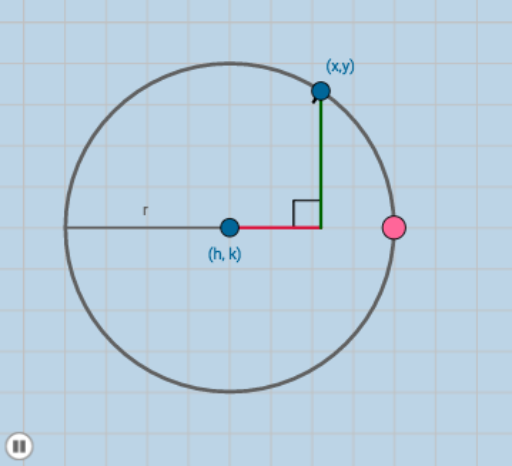
This example demonstrates the dynamic changes of a circle. Key mathematical concepts include the equation of a circle, piecewise functions, and transformations. Using GeoGebra commands such as Circle, Point, Segment, Intersect, etc., a dynamic geometric figure is constructed. Suitable for high school mathematics education and learning.
GeoGebra Commands & Parameters
Circle(A, B) → cPoint(c) → CSegment(A, C) → gIntersect(a, f) → DSegment(A, D) → dSegment(D, C) → eDistance(D, C) → distanceDCDistance(A, D) → distanceADDistance(A, C) → distanceACDilate(A, If[0 < h ≤ 1, 1 - h, 0], D) → A'Segment(A, A') → iDilate(D, If[1 < h ≤ 2, 2 - h, 0], C) → D'Segment(D, D') → jAngle(C, D, A) → αDilate(C, If[2 < h ≤ 3, 3 - h, 0], A) → C'Segment(C, C') → kPolygon(A, D, C) → poly1, c_1, a_1, d_1Distance(A, B) → lPoint(f) → ERay(A, E) → mPoint(m) → FRay(A, F) → nIntersect(c, f, 1) → GSegment(A, G) → q
AI Drawing Prompt Reference
Draw a circle and move a point C on it. Draw a line segment g through points A and C. Find the intersection point D of the circle c and the function f, and draw line segments d and e. Calculate the distances between points D and C, A and D, and A and C. Then, scale point A and D based on the value of h to get point A', and draw line segment i. Similarly, scale point D and C to get point D', and draw line segment j. Calculate the angle CAD, then scale point C to get point C', and draw line segment k. Finally, draw triangle ADC and find the other intersection point G of the circle c and the line f, and draw line segment AG.
The prompt above was compiled from the original drawing commands and is for reference only.