
Animation 164: Geometric Transformations and Polygon Construction
Loading the math board and drawing, please wait…
In collections
CCSS High School: Geometry (Congruence) Volume 2
CCSS High School: Geometry (Congruence) Volume 2
CCSS High School: Geometry (Congruence) Volume 2
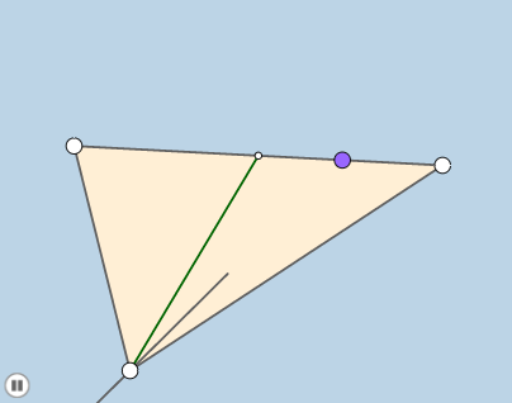
This example demonstrates the dynamic transformation of polygons in a 2D plane through animation, including translation, rotation, and dilation. Core mathematical concepts involve vectors, matrices, geometric transformations, and analytical geometry. The construction utilizes commands like Polygon, Segment, Midpoint, Dilate, Rotate, Point, Circle, Line, Intersect, Ray, Angle, CircleArc from GeoGebra. Suitable for high school and above students to understand geometric transformations and the dynamic behavior of complex shapes.
GeoGebra Commands & Parameters
Polygon(A, C, B) → poly1, c, a, bSegment(B, A) → fSegment(B, C) → gMidpoint(A, C) → MDilate(A, If[0 < d ≤ 1, 1 - d, 0], M) → A'Segment(A, A') → hRotate(A, If[1 < d ≤ 2, ((d - 1) * π), π], M) → A'_1Rotate(A', If[1 < d ≤ 2, ((-(d - 1)) * π), (-π)], M) → A''Segment(A'_1, A'') → h'Dilate(B, If[2 < d ≤ 3, 3 - d, 0], M) → C'Segment(B, C') → iSegment(B, M) → jSegment(A, C) → kPoint(k) → DMidpoint(D, A) → ESegment(A, C) → lCircle(E, D) → eMidpoint(D, C) → FCircle(F, D) → pLine(B, D) → mIntersect(e, m, 2) → GIntersect(p, m, 2) → HSegment(M, G) → nSegment(M, H) → qCircle(B, 1) → rCircle(H, 1) → sIntersect(s, m, 2) → JIntersect(r, m, 1) → KRay(H, J) → tRay(B, K) → f_1Dilate(B, If[4 < d ≤ 5, 5 - d, 0], D) → B'Segment(B, B') → g_1Angle(D, E, G) → αAngle(C, F, H) → βRotate(D, If[5 < d ≤ 6, ((d - 5) * α), α], E) → D'CircleArc(E, D, D') → c_1Rotate(G, If[6 < d ≤ 7, ((d - 6) * ((2 * π) - α)), (2 * π) - α], E) → D'_1CircleArc(E, G, D'_1) → d_1Rotate(C, If[7 < d ≤ 8, ((d - 7) * β), β], F) → C'_1CircleArc(F, C, C'_1) → e_1Rotate(H, If[8 < d ≤ 9, ((d - 8) * ((2 * π) - β)), (2 * π) - β], F) → H'CircleArc(F, H, H') → k_1Angle(H, M, G) → γDilate(M, If[9 < d ≤ 10, 10 - d, 0], H) → M'Segment(M, M') → i_1Dilate(M, If[10 < d ≤ 11, 11 - d, 0], G) → M'_1Segment(M, M'_1) → j_1Rotate(M, If[11 < d ≤ 12, ((-(d - 11)) * ((2 * π) - γ)), (-((2 * π) - γ))], M) → M'_2Rotate(M', If[11 < d ≤ 12, ((-(d - 11)) * ((2 * π) - γ)), (-((2 * π) - γ))], M) → M''Segment(M'_2, M'') → l_1Ray(B, D) → h_1Point(h_1) → IRay(D, I) → m_1
AI Drawing Prompt Reference
Create a dynamic geometric animation showing transformations of a polygon in a 2D plane, including translation, rotation, and dilation. Start with a triangle, mark midpoints of its sides. From one vertex, draw a segment to the opposite side's midpoint, then apply scaling and rotation along this direction to create moving vertex traces. Inside the triangle, construct two circles centered at a point on a side and a midpoint, intersect them with a line, and connect the intersection points to form new segments and rays. Finally, draw circular arcs around two midpoints, rotate triangle vertices along these arcs, and use scaling and rotation to demonstrate continuous deformation of the polygon during the animation.
The prompt above was compiled from the original drawing commands and is for reference only.