
Animation 101: Multi-Object Dynamic Geometry Demo
Loading the math board and drawing, please wait…
In collections
Geometry Review
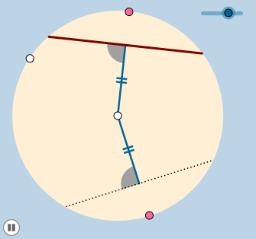
① This example demonstrates the fundamentals of dynamic geometry animation by using sliders to drive the coordinated motion of multiple geometric objects, including circles, points, segments, intersections, perpendicular lines, and rotated sectors. ② Core mathematical concepts include circles and tangents, congruence transformations, random variables, Poisson distribution, curve sketching, and means, but the focus is on geometric construction and interactive dynamics. ③ Construction highlights: Based on the summary, the example employs GeoGebra commands such as Circle, Point, Segment, Intersect, OrthogonalLine, Dilate, Min, CircleSector, Rotate, Angle, Line, Vector, and Translate, creating numerous objects (A, B, c, C, D, a, b, d, e, E, F, f, g, G, H, I, J, j, k, h, A', A'_1, i, l, m, n, p, q, r, s, K, L, M, N, O, P, c_1, t, t', d_1) to achieve synchronized animations via sliders controlling rotation, translation, and scaling. ④ This resource is ideal for middle and high school teachers to illustrate geometric transformations, function graphs, and statistical concepts dynamically, and for students to explore dependencies among geometric objects, fostering dynamic thinking and mathematical modeling skills.
GeoGebra Commands & Parameters
Circle(A, B) → cPoint(c) → CPoint(c) → DSegment(A, C) → aSegment(A, D) → bIntersect(e, a, 1) → EIntersect(e, b, 1) → FOrthogonalLine(E, a) → fOrthogonalLine(F, b) → gIntersect(c, f, 2) → GIntersect(c, f, 1) → HIntersect(c, g, 1) → IIntersect(c, g, 2) → JSegment(G, H) → jSegment(I, J) → kDilate(A, If[0 < h ≤ 1, 1 - h, 0], E) → A'Dilate(A, If[0 < h ≤ 1, 1 - h, 0], F) → A'_1Segment(A, A') → iSegment(A, A'_1) → lMin(d, m) → nCircle(E, (0.25 * n)) → pCircle(F, (0.25 * n)) → qSegment(A, E) → rSegment(A, F) → sIntersect(p, r) → K,Intersect(q, s) → L,Intersect(q, k) → M, NIntersect(p, j) → O, PCircleSector(F, N, L) → c_1CircleSector(E, K, P) → tRotate(t, If[1.5 < h ≤ 2.5, ((-(h - 1.5)) * π / 2), ((-π)) / 2], E) → t'Rotate(c_1, If[2.5 < h ≤ 3.5, ((h - 2.5) * π / 2), π / 2], F) → d_1Angle(F, A, E) → αRotate(A, If[3.5 < h ≤ 4.5, ((-(h - 3.5)) * α), (-α)], A) → A'_2Rotate(A', If[3.5 < h ≤ 4.5, ((-(h - 3.5)) * α), (-α)], A) → A''Segment(A'_2, A'') → i'Dilate(H, If[0 < h ≤ 1, 1 - h, 0], G) → H'Segment(H, H') → f_1Dilate(I, If[0 < h ≤ 1, 1 - h, 0], J) → I'Segment(I, I') → g_1Line(J, f_1) → h_1Point(h_1) → QAngle(Q, J, I) → βDilate(H, If[5 < h ≤ 6, 6 - h, 0], J) → H'_1Vector(H, H'_1) → uTranslate(H, u) → H'_2Translate(H', u) → H''Segment(H'_2, H'') → i_1Rotate(H'_2, If[6 < h ≤ 7, ((h - 6) * β), β], J) → RRotate(H'', If[6 < h ≤ 7, ((h - 6) * β), β], J) → H'''Segment(R, H''') → j_1
AI Drawing Prompt Reference
Create a dynamic geometry diagram with a circle defined by a center and a point on it. Place two moving points on the circle, and draw radii from the center to these points. Construct perpendicular lines through specific points on these radii, intersecting the circle at four points, and connect them to form two chords. Use sliders to control the movement of points along the radii, which also drives the rotation of two small circles and sectors, along with angle displays. The figure includes the circle, radii, perpendiculars, chords, small circles, sectors, segments, and rotated copies, all animating synchronously.
The prompt above was compiled from the original drawing commands and is for reference only.