
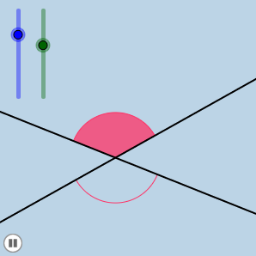
Animation 1: Dynamic Cone and Hyperbola Construction
Loading the math board and drawing, please wait…
In collections
Congruence (CO) Cluster
Congruence (Vol 2)
CCSS High School: Geometry (Congruence) Volume 2
CCSS High School: Geometry (Congruence) Volume 2
CCSS High School: Geometry (Congruence) Volume 2
Geometry (Congruence) Volume 2
CCSS High School: Geometry (Congruence) Volume 2
CCSS High School: Geometry (Congruence) Volume 2
CCSS High School: Geometry (Congruence) Volume 2
CCSS High School: Geometry (Congruence) Volume 2
CCSS High School: Geometry (Congruence) Volume 2
CCSS High School: Geometry (Congruence) Volume 2
CCSS High School: Geometry (Congruence) Volume 2
Gail LeBlancCCSS High School: Geometry (Congruence) Volume 2
CCSS High School: Geometry (Congruence) Volume 2
① This example presents a dynamic geometry animation where a cone, hyperbola, and equilateral triangles transform through rotations, dilations, and translations. ② Core mathematical concepts include conic sections, vectors, angles, similarity transformations, polygons, and properties of equilateral triangles. ③ The construction uses GeoGebra commands such as Point, Rotate, Angle, Line, Circle, Intersect, CircleSector, Dilate, Vector, Translate, and CircleArc, with numerous objects (e.g., m, A, B', α) controlling the animation. ④ Suitable for high school geometry and dynamic mathematics courses, it illustrates the integration of solid and coordinate geometry, vector applications in transformations, and the special role of equilateral triangles in conic sections.
GeoGebra Commands & Parameters
Point(a) → BRotate(B, α, A) → B'Angle(B, A, B') → βLine(A, B') → bCircle(A, 1) → eIntersect(b, d) → CCircle(C, 1) → fIntersect(e, a) → D, EIntersect(e, b) → F, GIntersect(f, b) → H, IIntersect(f, d) → J, KCircleSector(C, K, I) → gCircleSector(C, I, J) → hCircleSector(A, D, F) → sCircleSector(A, F, E) → tDilate(A, If[0 < i < 1, 1 - i], C) → A'Vector(A, A') → uTranslate(s, u) → s'Translate(t, u) → t'CircleArc(C, K, I) → d_1CircleArc(C, I, J) → e_1CircleArc(A, D, F) → g_1CircleArc(A, F, E) → k_1Rotate(t', ((i * 180))°, A') → t''Rotate(s', If[0 < i ≤ 1, (i * π), π], A') → s''
AI Drawing Prompt Reference
Draw a dynamic cone and hyperbola construction animation. First, create point A and point B, then rotate point B around point A to generate point B', calculate angle β, generate line b through point A and B', create a unit circle e with point A as the center, find the intersection points C of line b and line d, create a unit circle f with point C as the center, find the intersection points D and E of unit circle e and line a, find the intersection points F and G of unit circle e and line b, find the intersection points H and I of unit circle f and line b, find the intersection points J and K of unit circle f and line d, create a circular arc g with point C as the center and points K and I as endpoints, create a circular arc h with point C as the center and points I and J as endpoints, create a circular arc s with point A as the center and points D and F as endpoints, create a circular arc t with point A as the center and points F and E as endpoints, then create point A' with point C as the scaling center and point A as the scaling point, generate vector u from point A, use vector u as the displacement to generate circular arcs s' and t', finally rotate circular arcs s' and t' around point A' to generate circular arcs s'' and t''.
The prompt above was compiled from the original drawing commands and is for reference only.