
Animated Unit Circle: Trigonometry & Vector Visualization
Loading the math board and drawing, please wait…
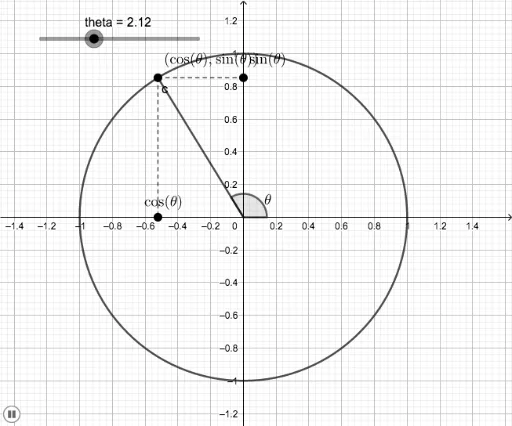
This example demonstrates a moving point on the unit circle as the angle changes, clearly showing the correspondence between trigonometric functions and unit vectors. Core mathematical concepts include the definition of unit circle, sine and cosine functions, and the mapping between angles and coordinates. Construction details: Use the Point command to create a moving point on the unit circle, define the angle parameter θ with the Angle command, draw the radius segment from the center to the moving point using Segment command, determine coordinate points (xcord, ycord) with Intersect command, and visualize trigonometric values through vector function f. Suitable for middle school trigonometry teaching, introduction to vector concepts in higher mathematics, and interactive demonstrations for students exploring the relationship between unit circle and trigonometric functions.
GeoGebra Commands & Parameters
Intersect(xAxis, yAxis) → DSegment(D, A) → fPoint(xAxis) → EAngle(E, D, A) → αSegment(A, B) → gSegment(A, C) → h
AI Drawing Prompt Reference
Draw a unit circle centered at the origin with x and y axes visible. Create a slider for angle measurement, and draw a line segment from the slider to the origin. Mark a moving point on the unit circle based on the slider's position, and draw a radius from the origin to this point. Display the x and y coordinates of the point, connecting them to the axes with line segments. Finally, represent the coordinates as vectors and show the trigonometric values changing as the slider moves.
The prompt above was compiled from the original drawing commands and is for reference only.