
Animated Unit Circle Sine Curve
Loading the math board and drawing, please wait…
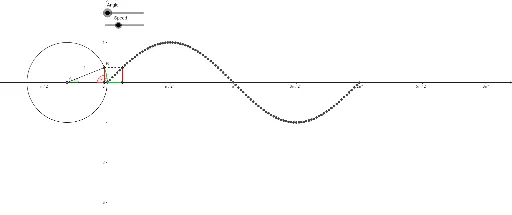
This example demonstrates the sine curve on a unit circle. Key mathematical concepts include trigonometry and the unit circle. Using GeoGebra commands such as Point, Circle, Rotate, Angle, Line, Intersect, Segment, CircleArc, a dynamic representation of the sine curve is constructed. Suitable for high school mathematics education and learning trigonometry.
GeoGebra Commands & Parameters
Point(xAxis) → ACircle(A, 1) → cPoint(c) → BRotate(B, a, A) → B'Angle(B, A, B') → αLine(B', yAxis) → bIntersect(b, xAxis) → CSegment(B', C) → dSegment(B', A) → eSegment(B', Q) → gCircleArc(A, B, B') → hSegment(B, R) → iSegment(Q, R) → jAngle(B', C, A) → β
AI Drawing Prompt Reference
Draw a unit circle centered at a point on the x-axis. Place a point on the circle and rotate it around the center by a variable angle. From the rotated point, drop a perpendicular to the y-axis, intersecting the x-axis at a new point. Connect this intersection to the rotated point and also to the center. Mark the circular arc from the initial point to the rotated point. Then draw a horizontal segment from the rotated point to a vertical guide line, and mark the angle at the intersection. This illustrates how rotation on the unit circle generates the sine curve.
The prompt above was compiled from the original drawing commands and is for reference only.