
Tirolina Simulation: Vector and Trigonometry Animation
Loading the math board and drawing, please wait…
In collections
El dominio del Tiempo (cinemática intuitiva)
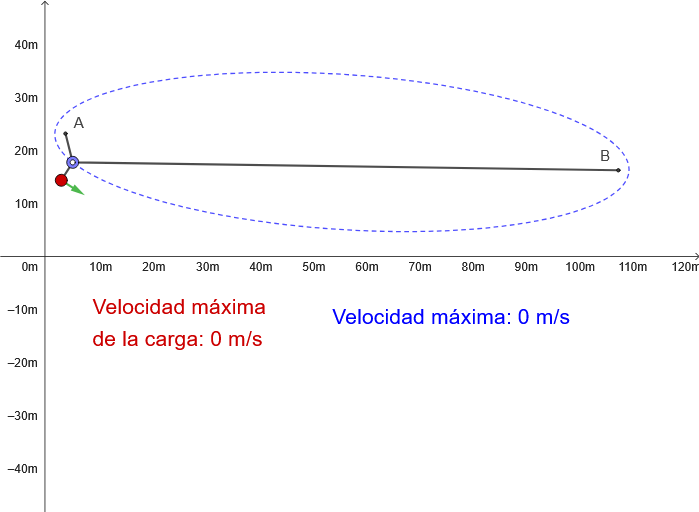
This GeoGebra example simulates a zipline (Tirolina) ride, demonstrating the geometric trajectory of sliding motion. Core mathematical concepts include: (1) Vector analysis - using 2D vectors to describe the motion state and force direction of the sliding object; (2) Trigonometry - applying sine and cosine functions to calculate angles and distances; (3) Parametric equations of ellipse and circle - constructing curved tracks using Ellipse and Circle commands. Construction highlights: Ellipse for the curved track, Circle for support structures, Segment for rope representation, UnitVector for direction vectors, PolyLine for trajectory paths, and Tangent for tangent lines. Ideal for secondary school mathematics teaching on vectors, trigonometry, and coordinate geometry, as well as physics kinematics demonstration.
GeoGebra Commands & Parameters
Ellipse(A, B, B + (2 * (B - A) / abs(B - A))) → c1Point(c1) → M1Tangent(M1, c1) → i1,UnitVector(i1) → n1Segment(M1 + g, M1 + gt1) → j1Point(c1) → C1PolyLine(A, M1, B) → tirolinaPolyLine(reg1) → pol1Circle(M1, 4) → c2Point(c2) → M2Segment(M1, M2) → fTangent(M2, c2) → i2,UnitVector(i2) → n2PolyLine(reg2) → pol2Segment(M2 + g, M2 + gt2) → j2
AI Drawing Prompt Reference
Draw a simulation of a zipline ride, using an ellipse to represent the curved track and circles for support structures, and line segments for the rope. Use vector analysis and trigonometric functions to calculate angles and distances, and parametric equations to draw the ellipse and circle. First, draw an ellipse c1, then take a point M1 on the ellipse, draw the tangent i1 at M1, and calculate its unit vector n1. Use M1 to draw a line segment j1 representing part of the rope. Next, draw a circle c2, take a point M2 on the circle, draw a line segment f from M1 to M2 representing part of the rope, then draw the tangent i2 at M2 and calculate its unit vector n2, and finally draw a line segment j2 representing another part of the rope.
The prompt above was compiled from the original drawing commands and is for reference only.