
Animated Parallelogram
Loading the math board and drawing, please wait…
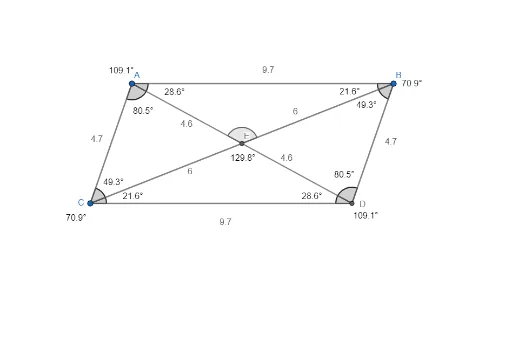
This example demonstrates the dynamic changes of a parallelogram. Key mathematical concepts include geometric transformations and vectors. Using GeoGebra commands such as Segment, Line, and Intersect, a dynamic animation of a parallelogram can be constructed. Suitable for students in middle school and above to learn about geometric transformations and vectors.
GeoGebra Commands & Parameters
Segment(A, B) → fSegment(A, C) → gLine(C, f) → hLine(B, g) → iIntersect(h, i) → DSegment(C, D) → jSegment(B, D) → kAngle(A, C, D) → αAngle(A, B, D) → βAngle(C, A, B) → γAngle(C, D, B) → δSegment(C, B) → lSegment(D, A) → mIntersect(l, m) → ESegment(C, E) → nSegment(E, B) → pSegment(D, E) → qSegment(E, A) → rAngle(A, C, E) → εAngle(E, C, D) → ζAngle(C, D, E) → ηAngle(E, D, B) → θAngle(D, B, E) → ιAngle(E, B, A) → κAngle(C, A, E) → λAngle(E, A, B) → μAngle(A, E, B) → ν