
Animated Cube Net
Loading the math board and drawing, please wait…
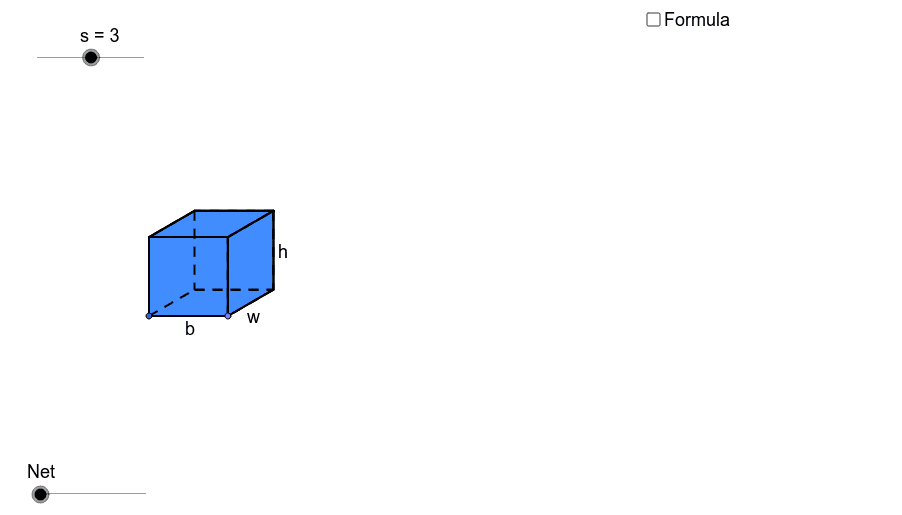
This example demonstrates the dynamic transformation of a cube's net, showcasing its geometric properties. It involves core math concepts like polygons, solid geometry, and transformations. Constructed using GeoGebra commands such as Point, Segment, Polygon, Circle, Line, Intersect, Rotate, OrthogonalLine, CircleArc, Vector, Translate, Ray, LineBisector, If, and Midpoint. Ideal for high school students learning about the properties of cube nets and for educational demonstrations.
GeoGebra Commands & Parameters
Point(Circle[A, s]) → BSegment(A, B) → aPolygon(A, B, 4.0) → poly1, a_1, b, c, d, C, DCircle(B, e) → fLine(A, B) → gIntersect(f, g, 2.0) → ERotate(E, 30.0*°, B) → E'OrthogonalLine(E', g) → hSegment(B, E') → iLine(C, i) → jIntersect(h, j) → FPolygon(E', F, 4.0) → poly2, e', f_1, k, l, G, HPolygon(A, H, G, D) → poly3, a_2, h_1, g_1, d_1Polygon(C, F, E', B) → poly4, c_1, f_2, e'_1, b_1Circle(B, A) → pCircle(A, B) → qIntersect(q, g, 2.0) → IIntersect(p, g, 2.0) → JCircle(J, B) → rIntersect(r, g, 2.0) → KLine(J, e'_1) → mLine(K, e'_1) → nLine(I, a_2) → tLine(H, E') → e_1Intersect(t, e_1) → LIntersect(m, e_1) → MIntersect(n, e_1) → NLine(B, E') → i_1Line(A, H) → j_1Intersect(f, i_1, 2.0) → OLine(O, g) → k_1Circle(E', B) → p_1Intersect(p_1, i_1, 2.0) → PLine(P, e_1) → l_1Intersect(j_1, l_1) → QLine(C, B) → m_1Circle(C, B) → q_1Intersect(q_1, m_1, 2.0) → RLine(R, c_1) → n_1Intersect(h, n_1) → SIntersect(j_1, k_1) → TCircleArc(C, R, D) → r_1CircleArc(B, K, R) → s_1CircleArc(E', N, S) → t_1CircleArc(E', M, F) → c_2CircleArc(B, J, C) → d_2CircleArc(A, B, I) → e_2CircleArc(H, G, L) → g_2CircleArc(F, S, G) → h_2Vector(F, P) → uVector(C, O) → vVector(D, R) → wVector(S, N) → u_1Vector(D, I) → v_1Translate(D, Vector[o * w]) → D'_1Ray(C, D'_1) → b_2Intersect(r_1, b_2, 1.0) → UTranslate(G, Vector[o * w]) → G'_1Ray(F, G'_1) → i_2Intersect(h_2, i_2, 1.0) → VLineBisector(F, P) → j_2Intersect(f, j_2, 2.0) → WCircleArc(W, P, F) → k_2Line(W, l_1) → l_2LineBisector(G, Q) → m_2Intersect(l_2, m_2) → ZCircleArc(Z, Q, G) → p_2Translate(C, Vector[(o - 1.0) * v]) → C'Translate(D, Vector[(o - 1.0) * v]) → D'_2If(o < 1.0, C, If[o < 2.0, C', O]) → A_1If(o < 1.0, D, If[o < 2.0, D'_2, T]) → B_1Translate(D, Vector[(o - 2.0) * v_1]) → D'Translate(G, Vector[(o - 2.0) * v_1]) → G'_2Ray(A, D') → n_2Ray(H, G'_2) → q_2Intersect(e_2, n_2, 1.0) → C_1Intersect(g_2, q_2) → D_1,If(o < 2.0, G, If[o < 3.0, D_1, L]) → E_1If(o < 2.0, D, If[o < 3.0, C_1, I]) → F_1Translate(G, Vector[(o - 3.0) * u]) → G'Translate(F, Vector[(o - 3.0) * u]) → F'Ray(H, G') → r_2Ray(E', F') → s_2Intersect(p_2, r_2, 1.0) → G_1Intersect(k_2, s_2, 1.0) → H_1If(o < 3.0, G, If[o < 4.0, G_1, Q]) → I_1If(o < 3.0, F, If[o < 4.0, H_1, P]) → J_1Translate(S, Vector[(o - 4.0) * u_1]) → S'Ray(E', S') → t_2Intersect(t_1, t_2, 1.0) → K_1Intersect(c_2, t_2, 1.0) → L_1Translate(R, Vector[(o - 4.0) * u_1]) → R'Ray(B, R') → a_3Intersect(s_1, a_3, 1.0) → M_1Intersect(d_2, a_3, 1.0) → N_1If(o < 1.0, U, If[o < 4.0, R, If[o < 5.0, M_1, K]]) → O_1If(o < 1.0, V, If[o < 4.0, S, If[o < 5.0, K_1, N]]) → P_1If(o < 4.0, C, If[o < 5.0, N_1, J]) → Q_1If(o < 4.0, F, If[o < 5.0, L_1, M]) → R_1Midpoint(B, E') → S_1Midpoint(A, H) → T_1Line(T_1, S_1) → c_3Circle(S_1, a / 2.0) → d_3OrthogonalLine(S_1, c_3) → g_3Intersect(d_3, g_3) → U_1, V_1Polygon(U_1, V_1, 4.0) → poly11, u_2, v_2, k_3, l_3, W_1, Z_1Polygon(Z_1, W_1, 4.0) → poly12, z_1, w_1, m_3, n_3, A_2, B_2Polygon(U_1, Z_1, 4.0) → poly13, u_3, z_2, s_3, t_3, C_2, D_2Polygon(W_1, V_1, 4.0) → poly14, w_2, v_3, c_4, d_4, E_2, F_2Polygon(V_1, U_1, 4.0) → poly15, v_4, u_4, e_4, f_4, G_2, H_2Polygon(H_2, G_2, 4.0) → poly16, h_6, g_4, i_4, j_4, I_2, J_2Segment(B, U_1) → m_4LineBisector(m_4) → n_4Vector(B, U_1) → zVector(T, C_2) → z_4Vector(L, A_2) → u_5Vector(P, E_2) → w_5Translate(I, Vector[z * (o - 5.0)]) → I'Translate(A, Vector[z * (o - 5.0)]) → A'Translate(B, Vector[z * (o - 5.0)]) → B'Translate(J, Vector[z * (o - 5.0)]) → J'Translate(K, Vector[z * (o - 5.0)]) → K'Translate(L, Vector[u_5 * (o - 5.0)]) → L'Translate(H, Vector[u_5 * (o - 5.0)]) → H'Translate(E', Vector[u_5 * (o - 5.0)]) → E''Translate(M, Vector[u_5 * (o - 5.0)]) → M'Translate(N, Vector[u_5 * (o - 5.0)]) → N'Translate(T, Vector[z_4 * (o - 5.0)]) → T'Translate(O, Vector[z_4 * (o - 5.0)]) → O'Translate(P, Vector[w_5 * (o - 5.0)]) → P'Translate(Q, Vector[w_5 * (o - 5.0)]) → Q'If(o < 5.0, O_1, If[o < 6.0, K', I_2]) → K_2If(o < 5.0, P_1, If[o < 6.0, N', J_2]) → L_2If(o < 5.0, Q_1, If[o < 6.0, J', G_2]) → M_2If(o < 5.0, R_1, If[o < 6.0, M', H_2]) → N_2If(o < 5.0, E', If[o < 6.0, E'', V_1]) → O_2If(o < 5.0, H, If[o < 6.0, H', W_1]) → P_2If(o < 5.0, E_1, If[o < 6.0, L', A_2]) → Q_2If(o < 5.0, J_1, If[o < 6.0, P', E_2]) → R_2If(o < 5.0, I_1, If[o < 6.0, Q', F_2]) → S_2If(o < 5.0, B, If[o < 6.0, B', U_1]) → T_2If(o < 5.0, A, If[o < 6.0, A', Z_1]) → U_2If(o < 5.0, A_1, If[o < 6.0, O', D_2]) → V_2If(o < 5.0, B_1, If[o < 6.0, T', C_2]) → W_2If(o < 5.0, F_1, If[o < 6.0, I', B_2]) → Z_2Polygon(Z_2, Q_2, P_2, U_2) → poly5, z_3, q_3, p_3, u_6Polygon(U_2, T_2, V_2, W_2) → poly6, u_7, t_4, v_5, w_3Polygon(U_2, P_2, O_2, T_2) → poly7, u_8, p_4, o_2, t_5Polygon(O_2, N_2, M_2, T_2) → poly8, o_1, n_5, m_5, t_6Polygon(N_2, L_2, K_2, M_2) → poly9, n_6, l_4, k_4, m_6Polygon(O_2, R_2, S_2, P_2) → poly10, o_3, r_3, s_4, p_5Intersect(k, v_5) → B_3Segment(G, B_3) → b_3Intersect(v_5, a_2) → A_3Segment(P_2, A_3) → e_3Intersect(t_4, p_5) → C_3Intersect(m_5, p_5) → D_3Segment(D_3, C_3) → f_3Segment(D_3, P_2) → h_3Point(Circle[E_3, s]) → F_3Segment(E_3, F_3) → j_3Line(E_3, F_3) → a_4Circle(F_3, e) → h_4Intersect(h_4, a_4, 2.0) → G_3Rotate(G_3, 30.0*°, F_3) → H_3Segment(F_3, H_3) → b_4Line(H_3, j_3) → q_4Line(E_3, b_4) → r_4Intersect(q_4, r_4) → I_3OrthogonalLine(H_3, q_4) → a_5OrthogonalLine(F_3, j_3) → b_5OrthogonalLine(E_3, a_4) → c_5OrthogonalLine(I_3, q_4) → d_5Circle(E_3, s) → e_5Intersect(e_5, c_5, 2.0) → J_3OrthogonalLine(J_3, c_5) → f_5Circle(I_3, s) → g_5Intersect(g_5, d_5, 2.0) → K_3OrthogonalLine(K_3, d_5) → h_5Intersect(a_5, h_5) → L_3Intersect(b_5, f_5) → M_3Polygon(J_3, M_3, L_3, K_3) → poly17, j_5, m_7, l_5, k_5Polygon(J_3, E_3, F_3, M_3) → poly18, j_6, e_6, f_6, m_8Polygon(F_3, M_3, L_3, H_3) → poly19, f_7, m_9, l_6, h_7Polygon(I_3, K_3, L_3, H_3) → poly20, i_5, k_6, l_7, h_8Polygon(E_3, J_3, K_3, I_3) → poly21, e_7, j_7, k_7, i_6Polygon(E_3, I_3, H_3, F_3) → poly22, e_8, i_7, h_9, f_8
AI Drawing Prompt Reference
Draw a cube net and dynamically demonstrate its geometric transformations. Start by drawing a square, then rotate and connect adjacent vertices to form the faces of the net. Next, through rotation and movement, show the relationships between the faces, ultimately forming a dynamic cube net.
The prompt above was compiled from the original drawing commands and is for reference only.